Sales1 min read213 words

Creating a text area limited to 140 characters like Twitter with JQuery

Emir Eskici

PlusClouds Author

Cloud & SaaS

How to Create a Text Area Limited to 140 Characters with jQuery

Creating a 140 Character Sensitive Text Area Using Jquery

Jquery is a JavaScript library created to simplify the use of JavaScript. Since 2006, it has been used to meet the needs of both JavaScript and Ajax as well as effect libraries. I wrote a small blog post explaining the benefits and advantages of Jquery. In this blog, I will answer the question, How to count 140 characters with Jquery?

First, I am creating a simple textarea with HTML and a simple area below it to display the number of characters entered.

HTML

Description

Now it's time for our Jquery code

JavaScript/Jquery

$(function (){

$("#textAlani").keyup(function (e) { // I selected the textarea and entered my functions inside

    var harfLimiti=140;  // I specified the maximum number of letters to be entered
    var sayac=$(this).val().length; // I defined a variable that will check the 140 letter count above
    
    $("#girilenHarf").text(sayac) // A small definition to show the entered letters 
    $("#kalanHarf").text(harfLimiti-sayac) // To show the remaining letter count

    if (sayac>harfLimiti) { 
        $("#uyari").text("You cannot enter more letters...")
    }// If the number of letters in the counter exceeds the number in the 'harfLimit' variable,
    // write the text "You cannot enter more letters..." to the selected element using the text property
});

})

How to Count 140 Characters with Jquery?

Conclusion
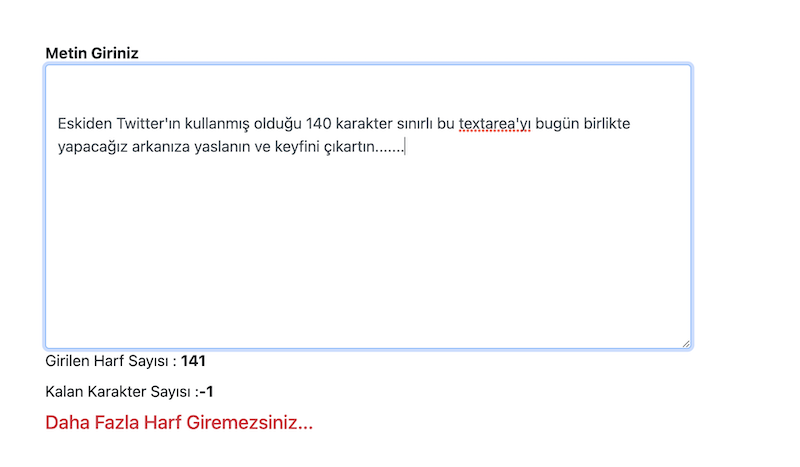
Description

#There is no text provided for translation. Please provide the text you would like to be translated into English.

Veelgestelde Vragen

How can I count 140 characters in a textarea using jQuery?

The code attaches a keyup handler to the textarea with id textAlani, defines harfLimiti as 140, and uses sayac = $(this).val().length to count characters. It then updates #girilenHarf with the current count and #kalanHarf with harfLimiti - sayac, and if sayac exceeds harfLimiti it updates #uyari with a warning.

What HTML elements do I need to display the character count and remaining characters?

You need a textarea with id textAlani and elements with ids girilenHarf and kalanHarf to show the current and remaining character counts. The example also uses an element with id uyari to show the warning when the limit is exceeded.

What is the purpose of harfLimiti and sayac in the example?

harfLimiti stores the maximum allowed characters (140) and sayac stores the current character count derived from the textarea value. The logic compares sayac to harfLimiti to determine if more input is allowed.

How is the jQuery code initialized to run when the page loads?

The code runs when the document is ready using $(function () { ... }); to set up the keyup handler. This ensures the counters start working as soon as the page is ready.

What does the code do when the user types more than 140 characters?

If sayac exceeds harfLimiti, the code updates the element with id uyari to display the message You cannot enter more letters.... This provides a visible warning to the user.

Can I adapt this example to a different character limit?

Yes, by changing harfLimiti to your desired limit; the remaining count and the warning will adjust accordingly. The rest of the logic updates the current and remaining counts based on the new limit.

Does this approach require any plugins or only HTML and jQuery?

This approach uses only a simple HTML textarea and jQuery code to update counts in real time. No additional plugins are mentioned or required.

Where is the remaining character count displayed in the example?

The remaining count is shown by updating the element with id kalanHarf with harfLimiti - sayac. This keeps the user informed of how many characters are left.