Your SDR sent the same cold email three times last quarter. Different subject lines, same body, same ask, same single channel. The reply rate was 1.4%. You know this because you pulled the sequence report yourself, stared at it for longer than you should have, and then closed the tab without saying anything in the team Slack.
The problem is not the copy. It is not the offer. It is that the prospect received a single-channel signal from a stranger, processed it as noise, and moved on. They do not remember your rep's name. They will not remember it after the fourth email either.
Key takeaways:
- Single-channel outreach is structurally underperforming in 2026: B2B buyers now interact across six to ten channels before a purchase decision.
- Engaging three or more channels produces roughly a 287% lift in purchase rate versus single-channel approaches.
- The optimal cadence is seven to twelve touches over fourteen to twenty-one days, front-loaded in the first four days.
- LeadOcean detects buying signals and triggers sequence enrollment; Eaglet executes conditional multi-channel logic across email, LinkedIn, and phone.
- The three metrics that matter are reply rate (target 12% to 18%), SAL velocity (under 21 days), and pipeline contribution by sequence.
Multi-channel outreach changes that math entirely. When a decision-maker sees your brand on LinkedIn, receives a relevant email referencing something they actually care about, and then gets a short phone call that opens with context rather than a pitch, you stop being noise. You become a pattern. Patterns get responses. According to research cited by Leadfeeder's 2026 lead generation trend analysis, B2B buyers now interact across an average of six to ten channels before making a purchase decision. The revenue teams winning in 2026 are not sending more emails. They are engineering coordinated sequences across email, LinkedIn, and phone that compound on each other.
This guide covers exactly how to build that omnichannel B2B outreach engine using LeadOcean and Eaglet, from sequence architecture to CRM reporting to the mistakes that quietly kill reply rates before you ever diagnose them.
Table of Contents
- Why Single-Channel Outreach Is Dead in 2026 (The Data)
- The Three-Channel Stack: Email, LinkedIn, and Phone, What Each Does and When
- How to Build the Sequence Architecture in Eaglet
- Using LeadOcean Buying Signals to Trigger the Right Channel at the Right Time
- Timing and Cadence: How Many Touches, Over How Many Days
- Personalisation at Scale: Dynamic Fields, Industry Variables, and Signal-Based Messaging
- How to Connect LeadOcean and Eaglet to HubSpot and Salesforce for Closed-Loop Reporting
- Measuring What Matters: SAL Velocity, Reply Rate, and Pipeline Contribution
- Common Mistakes That Kill Multi-Channel Sequences (and How to Fix Them)
Why Single-Channel Outreach Is Dead in 2026 (The Data)
The numbers are not subtle. Research from MarketBoats' B2B lead generation predictions puts the purchase rate lift for B2B marketers engaging three or more channels at roughly 287% compared to single-channel approaches. That is not a marginal improvement. That is a structural difference in how buying decisions get made.
The reason is cognitive, not algorithmic. A cold email from someone you have never heard of carries almost no weight. A LinkedIn connection request from that same person, followed by a comment on something you posted, followed by an email that references your company's recent activity, followed by a short call, creates familiarity. Familiarity creates trust. Trust creates pipeline.
What has changed in 2026 specifically is the noise floor. Email open rates across most B2B verticals have compressed as inboxes have become more crowded and spam filters more aggressive. LinkedIn InMail acceptance rates have dropped as the platform has matured and buyers have grown more selective. Phone calls from unknown numbers go to voicemail. Any one of these channels in isolation now delivers diminishing returns.
The teams outperforming their targets are not trying harder on one channel. They are treating the three channels as a single coordinated system where each touchpoint reinforces the last, and where the timing and messaging of each touch is driven by what the prospect actually did, not by a fixed calendar.
The Three-Channel Stack: Email, LinkedIn, and Phone, What Each Does and When
Each channel in the multi-channel sales sequence has a distinct job. Confusing those jobs is one of the most common sequence design errors.
Email is your primary delivery vehicle for information density. It is the channel where you can share a case study, reference a specific pain point, attach a one-pager, or include a multi-paragraph argument for why a conversation is worth the prospect's time. Email is asynchronous by nature, which means the prospect reads it on their schedule. That is a feature, not a bug, as long as the email is short enough to be read and specific enough to be relevant. Email is also the channel where you can run A/B tests at scale, track open and click behavior, and feed that behavioral data back into the sequence logic.
LinkedIn is your credibility layer. Before a decision-maker responds to your email, there is a roughly 70% chance they have looked at your LinkedIn profile, or your rep's profile, to verify that you are a real person with relevant experience. LinkedIn touchpoints, whether connection requests, profile views, post comments, or short direct messages, serve to confirm that legitimacy. They also create ambient awareness. A prospect who has seen your rep engage thoughtfully with a post in their feed is far more likely to open the next email than one who has had zero prior exposure.
Phone is your conversion accelerator. It is not a prospecting tool in the cold-call sense. In a coordinated sequence, the phone call comes after the prospect has already received email and LinkedIn touches. They know who you are. The call is short, direct, and references the prior context. Its job is to break the asynchronous pattern and create a moment where a decision can happen in real time.
The sequence architecture that works is not round-robin across channels. It is a specific ordering: establish presence on LinkedIn first, open with email, reinforce with phone at the moment of highest engagement signal.
How to Build the Sequence Architecture in Eaglet
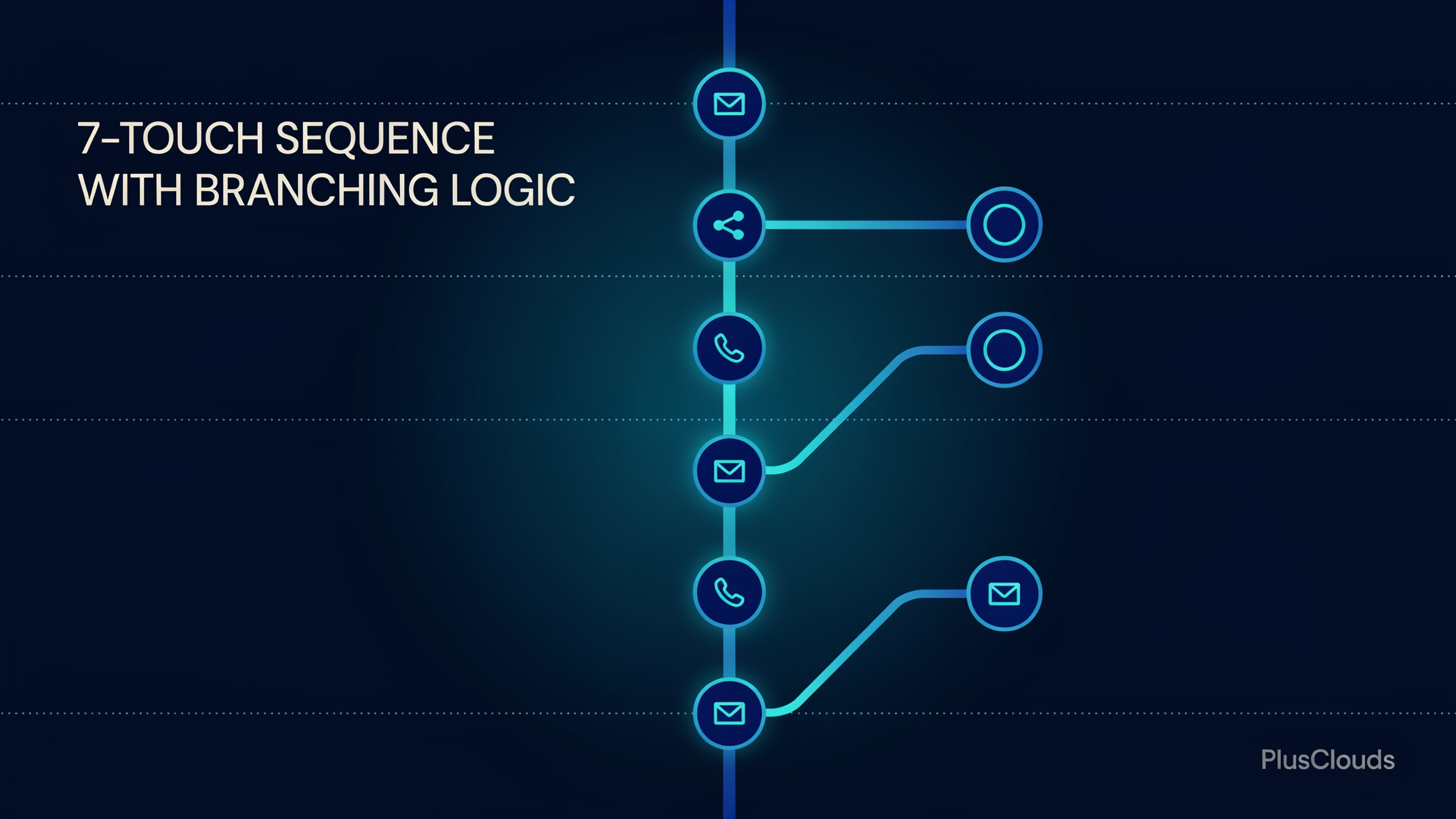
Eaglet by PlusClouds is where the sequence logic lives. Think of it as the conductor: it knows which contacts are in which stage, which touchpoints have been delivered, which have been opened or clicked, and what the next action should be for each individual record.
A standard seven-touch omnichannel sequence in Eaglet looks like this:
Day 1:   LinkedIn connection request (personalized note, 300 chars max)
Day 2:   Email 1, Problem-framing opener, no ask
Day 4:   LinkedIn message, Brief, references shared context
Day 6:   Email 2, Social proof or case study, soft CTA
Day 9:   Phone call, 60 seconds max, references Email 1 subject line
Day 11:  Email 3, Value-add content (report, tool, benchmark)
Day 14:  Email 4, Break-up email, direct ask, easy exit
Within Eaglet, each step is configured as a node in the sequence builder. Each node has three properties: the channel, the content template, and the trigger condition. Trigger conditions are where most teams underinvest. A basic sequence triggers the next touch after a fixed number of days. A well-built sequence triggers based on behavior: if Email 1 was opened but not clicked, Email 2 gets a different subject line variant. If the LinkedIn connection was accepted, the Day 4 message acknowledges it. If the phone call reached voicemail, the Day 11 email opens with a reference to the missed call.
Eaglet's branching logic handles these conditional paths without manual intervention. You define the conditions once. The platform routes each contact through the branch that fits their actual behavior.
One configuration detail that matters: set a global suppression rule that removes any contact from the sequence the moment they reply to any channel. Nothing damages credibility faster than receiving an automated LinkedIn message the day after you have already booked a meeting via email.
Using LeadOcean Buying Signals to Trigger the Right Channel at the Right Time
Sequence architecture tells you the order of touches. Buying signals tell you when to start the sequence and which message angle to use.
LeadOcean monitors a continuous stream of behavioral and firmographic signals across its database of 1.8 billion-plus company and contact records. When a target account shows a signal, whether that is a job posting for a role that indicates a new budget, a technology change detected in their stack, a funding announcement, or a web visit to a relevant page, that signal becomes the trigger for sequence activation.
This matters for channel selection, not just timing. A company that just posted three VP of Sales roles is in active growth mode. The right first email angle is expansion and scale. A company that just replaced their CRM is in a technology evaluation mindset. The right angle is integration and workflow. LeadOcean surfaces these signals so that Eaglet's templates can pull the relevant variable into the first touch automatically.
The mechanics work like this: LeadOcean detects a signal on a target account, scores it against your configured ICP criteria, and if the account clears the threshold, pushes the contact record into an Eaglet sequence with a signal tag attached. That tag determines which message variant fires on Day 2. The contact receives an email that references something real about their business. Not a generic opener. A specific one.
For a deeper look at how to build the signal detection layer that feeds this workflow, the guide on building a signal-led outbound sequence from buying signal to booked meeting covers the upstream architecture in detail.
Timing and Cadence: How Many Touches, Over How Many Days
The research on cadence converges on a range of seven to twelve touches over fourteen to twenty-one days as the sweet spot for B2B outbound in 2026, according to Cleverly's analysis of B2B lead generation trends. Fewer than seven touches and you have not created enough pattern recognition. More than twelve touches in a compressed window and you cross from persistent into aggressive, which damages reply rates.
The fourteen-day window is not arbitrary. It maps to roughly two standard business weeks, which is the natural rhythm of most decision-makers' planning cycles. A contact who is not ready to engage in week one may be in a different mental state in week two, after a Monday morning review meeting or a Friday afternoon budget conversation.
Within that window, front-load your touches. The first four days should carry the most activity. Day 1 and Day 2 touches establish presence before the prospect has had a chance to fully categorize you. Days 6 and 9 maintain momentum. Days 11 and 14 are your close-out attempts, which should be shorter and more direct than the earlier touches.
Space matters as much as frequency. Do not send Email 1 and Email 2 on consecutive days unless a strong behavioral signal justifies it. Two emails in 48 hours from the same sender reads as desperation. Three days between emails reads as deliberate.
One timing rule that most teams ignore: never send an automated email on a Friday afternoon or a Monday morning. Friday emails get buried over the weekend. Monday morning inboxes are a war zone. Tuesday through Thursday, between 8am and 11am in the prospect's local timezone, consistently outperforms other windows. Eaglet's timezone-aware scheduling handles this automatically when you configure the contact's location field correctly.
Personalisation at Scale: Dynamic Fields, Industry Variables, and Signal-Based Messaging
Personalisation is not inserting {{first_name}} into a subject line. Every prospect has seen that. It does not move the needle.
Real personalisation at scale has three layers. The first is contact-level variables: name, title, company, and a specific observation about the company (a recent hire, a product launch, a funding round). LeadOcean's enrichment layer populates these fields automatically when a contact record is created, pulling from verified data sources so you are not working from stale LinkedIn profiles.
The second layer is industry-level variables: the specific pain points, regulatory pressures, and competitive dynamics that are true for a SaaS company but not a FinTech, or true for a Series B startup but not a 500-person mid-market firm. These are not personalized to an individual but they are personalized to a segment. In Eaglet, you configure these as template variants tied to industry or company size filters. A contact tagged as fintech receives a different Email 1 body than a contact tagged as saas_growth, even if both are in the same sequence.
The third layer is signal-based messaging: the specific variable that changes based on what triggered the sequence. This is the most powerful layer and the most underused. A contact who triggered sequence entry because their company posted a Head of Revenue Operations role gets an email that opens with a reference to scaling revenue operations. A contact who triggered because their company was acquired gets an email that references the integration challenges that typically follow an acquisition.
Here is what a signal-variable email opener looks like in Eaglet's template syntax:
Subject: {{company_name}} + {{signal_context_short}}

Hi {{first_name}},

Saw that {{company_name}} recently {{signal_event_description}}.
Teams in that position typically run into [specific pain point].
[One sentence on what you do about it.]

Worth a 15-minute call this week?
The {{signal_event_description}} field is populated by LeadOcean at the point of sequence enrollment. The rep does not write it. The system does. The result reads as researched because it is.
For the full mechanics of building a prospecting system that uses this signal layer to drive reply rates, the post on signal-first outbound and personalized-at-scale prospecting is worth reading alongside this one.
How to Connect LeadOcean and Eaglet to HubSpot and Salesforce for Closed-Loop Reporting
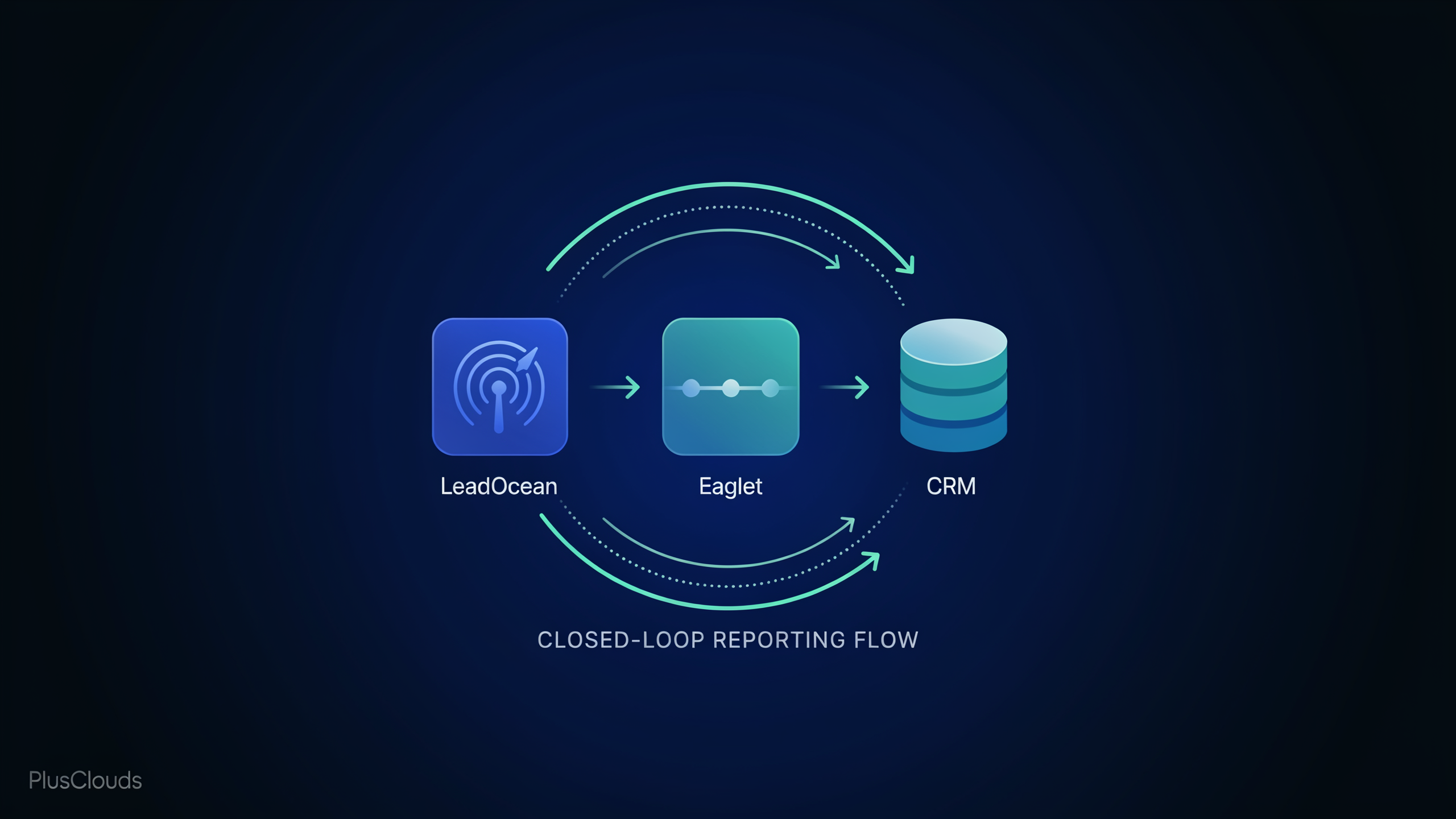
Sequence data that lives only inside your outreach platform is operationally useless. Your VP of Sales is not logging into Eaglet to check pipeline contribution. Your RevOps lead is not manually reconciling sequence activity against CRM opportunities. The data needs to flow automatically, in both directions.
LeadOcean and Eaglet both carry native integrations with HubSpot and Salesforce. The setup is a four-step process:
- Authenticate the CRM connection in LeadOcean's integration settings, mapping your CRM's contact and company objects to LeadOcean's record schema.
- Configure the field mapping so that LeadOcean's enrichment data (industry, company size, buying signal tags, ICP score) writes into the correct CRM properties on contact and account records.
- In Eaglet, connect the same CRM instance and map sequence enrollment, touchpoint delivery, opens, clicks, replies, and meeting bookings to CRM activity objects or custom properties.
- Set up a CRM workflow that creates a deal record automatically when a contact replies to any Eaglet sequence touch, assigning it to the owning rep and stamping it with the sequence name and signal source.
The result is a closed loop: LeadOcean identifies and enriches the contact, Eaglet runs the sequence and records every interaction, and HubSpot or Salesforce holds the full history from first signal to booked meeting to closed deal.
For teams building this integration from scratch, the detailed walkthrough of automating the full B2B prospecting workflow from lead discovery to booked meeting covers the CRM sync configuration in more depth.
Measuring What Matters: SAL Velocity, Reply Rate, and Pipeline Contribution
Most sequence reports measure the wrong things. Open rate is a vanity metric. Click rate is marginally better. The three numbers that actually tell you whether your omnichannel sequence is working are reply rate, sales-accepted lead (SAL) velocity, and pipeline contribution by sequence.
Reply rate is the percentage of enrolled contacts who respond to any touch in the sequence, across any channel. A well-configured omnichannel sequence targeting a properly qualified ICP should produce reply rates of 12% to 18% in 2026. Below 8% indicates either an ICP mismatch, a messaging problem, or both. Above 20% is possible with tight signal-based triggering and strong personalisation.
SAL velocity measures how many days elapse between sequence enrollment and a contact being marked as sales-accepted in the CRM. In a well-built sequence, the average should be under twenty-one days. If SAL velocity is creeping toward thirty or forty days, the sequence is either too long, the phone step is not being executed, or the CRM handoff process is creating friction.
Pipeline contribution by sequence is the dollar value of opportunities sourced from each sequence variant, divided by the number of contacts enrolled. This is the metric that tells you which sequence design, which ICP segment, and which signal trigger is generating the best return. Run this report by sequence name, by industry tag, and by signal type. The patterns that emerge will tell you where to concentrate enrollment and where to retire underperforming variants.
Common Mistakes That Kill Multi-Channel Sequences (and How to Fix Them)
Running channels in parallel instead of in sequence. Sending an email and a LinkedIn message on the same day does not multiply impact. It signals automation. Prospects notice when every channel activates simultaneously. Stagger your touches by at least 24 hours, preferably 48.
Using the same message across channels. The LinkedIn message that works is two sentences. The email that works is four to six short paragraphs. Copying the email body into a LinkedIn DM is one of the fastest ways to get ignored on both. Each channel has a native format. Respect it.
Enrolling contacts who have not cleared signal or ICP thresholds. Volume without qualification is the fastest way to burn a domain. If LeadOcean's ICP score for a contact is below your configured threshold, do not enroll them. A sequence of 200 well-qualified contacts outperforms a sequence of 2,000 marginal ones on every metric that matters.
Skipping the phone step because it feels uncomfortable. Phone calls are the highest-conversion touch in the sequence precisely because they are the hardest to automate and the most human. Teams that remove the phone step because their SDRs dislike cold calling consistently see reply rates drop by 20% to 30% compared to sequences that include it. The call does not need to be long. Sixty seconds, a clear reference to prior context, and a single yes-or-no question is enough.
Not suppressing active opportunities from sequence enrollment. If a contact is already in a deal stage in your CRM, they should not be receiving automated sequence touches. This requires a suppression list sync between your CRM and Eaglet, which takes fifteen minutes to configure and prevents the embarrassing situation of sending a "just checking in" email to someone your AE is closing next week.
Measuring success too early. A fourteen-day sequence needs at least four weeks of enrollment data before the reply rate stabilizes. Teams that pull the report after one week and declare the sequence dead are making decisions on incomplete data. Set a minimum enrollment threshold of 50 contacts and a minimum observation window of 30 days before drawing conclusions.
The mechanics described in this guide are not theoretical. They are the operational architecture that separates revenue teams generating consistent pipeline from those constantly wondering why their outreach is not working.
The starting point is clean, signal-enriched contact data and a sequence platform that can execute conditional logic across channels without manual intervention. LeadOcean handles the data and signal layer. Eaglet handles the sequence execution and CRM sync. Together, they give your SDR team the infrastructure to run omnichannel outreach at the scale of a large sales organization without the headcount that usually requires. If your current reply rates are sitting below 10%, that is the place to start.