Your cloud bill arrived 40% higher than last quarter's, and nobody can point to a specific new feature that justifies it. The workloads driving the increase are the same ones that have been running for two years: steady, predictable, and paying premium rates for elasticity they never actually use. Sound familiar?
You are not alone, and you are not wrong to question it. Across the industry, the "cloud-first by default" era is giving way to something more pragmatic. Analysts and infrastructure teams alike are calling it cloud repatriation: deliberately moving selected workloads off hyperscalers and onto bare metal, colocation, or private infrastructure where their economics make more sense. Industry outlooks for 2026 consistently flag this as one of the defining infrastructure shifts of the year, driven by cost pressure, AI capacity demands, and data sovereignty rules (DataBank, CloudKeeper).
Key takeaways
- Cloud repatriation in 2026 is selective, not ideological. The winning pattern is hybrid by design: steady-state workloads on dedicated or bare-metal hardware, elastic workloads in the cloud.
- The financial trigger is concrete: workloads above roughly 65% sustained utilization with a three-year-plus horizon almost always cost less on dedicated infrastructure, often 50 to 70 percent less.
- Compliance and data sovereignty (GDPR, NIS2, DORA, PCI DSS 4.0.1) are independent triggers that favor single-tenant infrastructure.
- Proven repatriation candidates: databases, AI training and inference, HPC and render pipelines, steady-state backends. Keep CI/CD, staging, and experiments elastic.
- Migration succeeds on patience: parallel environments, continuous replication, explicit rollback paths, and a full business cycle of validation.
This guide walks you through how to decide which workloads should leave the public cloud, which ones should stay, and where to put the ones that go. No ideology, no "cloud is dead" hot takes. Just a framework for matching each workload to the infrastructure that serves it best.
Table of Contents
- Why Cloud Repatriation Is the Fastest-Growing Infrastructure Trend of 2026
- Not All Workloads Are Cloud Workloads: The Fit-for-Purpose Framework
- The Financial Signal: When Your Cloud Unit Economics Break Down
- Compliance and Sovereignty: Regulatory Reasons to Repatriate
- The Repatriation Candidates: Databases, Simulations, Render Pipelines, and More
- Bare Metal vs. Cloud VMs vs. On-Premises: Matching the Destination to the Workload
- How PlusClouds Bare Metal (X7000 / Leo CN) and Cloud Servers Support a Dual-Mode Strategy
- Migration Playbook: How to Move Without Downtime
- How to Build an Ongoing Workload Review Process
- Key Takeaways: Your Cloud Exit Strategy in One Page
Why Cloud Repatriation Is the Fastest-Growing Infrastructure Trend of 2026
Repatriation is not a rejection of the cloud. It is a correction to the assumption that every workload belongs there forever.
Three forces are converging in 2026:
- Unit economics have caught up with reality. After a decade of cloud adoption, finance teams finally have multi-year data showing what steady-state workloads actually cost on hyperscalers (AWS, Azure, Google Cloud) versus what they would cost on owned or dedicated hardware. For predictable, always-on workloads, the gap is often 2x to 5x.
- AI workloads changed the hardware conversation. GPU capacity is scarce and expensive in the public cloud. Companies running sustained training or inference workloads on NVIDIA-class GPUs are discovering that owning GPUs pays for itself far faster than traditional server purchases ever did (Everpure Data).
- Regulation is drawing hard borders. GDPR enforcement, NIS2, DORA, and data sovereignty requirements are making it legally necessary for some workloads to live in specific jurisdictions or under specific controls, which dedicated infrastructure handles more naturally.
The pattern we see across successful repatriation efforts is consistent: nobody moves everything. Teams identify the 20 to 40 percent of their footprint that is steady-state and predictable, move that to dedicated or bare-metal infrastructure, and keep elastic, spiky workloads in the cloud. The result is often called hybrid by design, and it is quickly becoming the default architecture for scale-ups that have outgrown pure cloud economics.
If you want a deeper treatment of the destination side of this decision, our On-Premises Decision Framework covers how to evaluate dedicated hardware against cloud VMs for workloads that cannot leave your building.
Not All Workloads Are Cloud Workloads: The Fit-for-Purpose Framework
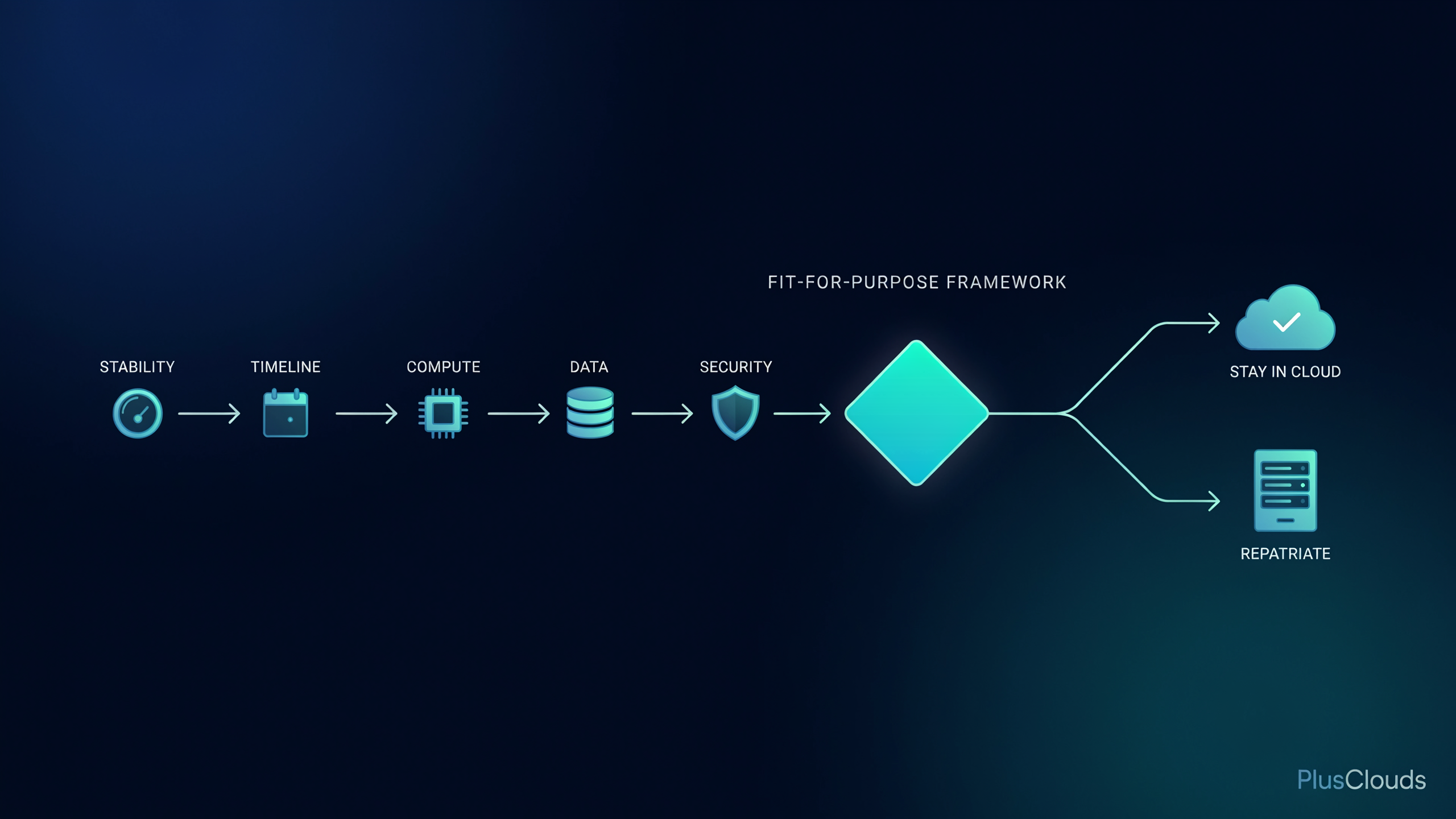
The single most useful mental model for repatriation decisions is this: match the workload's consumption pattern to the pricing model that rewards it.
Cloud VMs are priced like rental cars. Flexible, available on demand, and expensive if you keep them for years. Owned or dedicated hardware is priced like buying the car. High upfront commitment, dramatically cheaper per mile if you drive it constantly.
Score each of your workloads against five dimensions:
- Utilization stability. Does the workload run at a consistent load 24/7, or does it swing wildly? Steady workloads are repatriation candidates. Spiky ones belong in the cloud.
- Commitment horizon. Will this workload still exist in three years? A core database will. A three-month experiment will not.
- Hardware specificity. Does it need particular hardware (GPUs, high clock-speed CPUs, NVMe arrays, large RAM) that the cloud charges a premium for? Specificity favors ownership.
- Data gravity and egress. Does it constantly read from or write to large datasets? Egress fees and storage retrieval costs punish data-heavy workloads in the public cloud.
- Compliance constraints. Does regulation dictate where data lives, how it is isolated, or who can access it?
Workloads scoring high on stability, commitment, and hardware specificity, with heavy data gravity or compliance constraints, are your repatriation candidates. Workloads scoring high on elasticity and unpredictability should stay put.
This framework maps directly onto the hybrid placement strategies we describe in our hybrid cloud architecture guide, where steady workloads run on bare metal and burst workloads scale out on cloud VMs.
The Financial Signal: When Your Cloud Unit Economics Break Down
The clearest repatriation trigger is a simple calculation that most teams never run: what would this workload cost if I owned the hardware instead?
Let's make it concrete. Say you are running a steady-state database tier on three m6i.4xlarge-class instances, on-demand, at roughly $0.80 per hour. That is about $580 per instance per month (730 hours), or roughly $1,750 per month for the tier. Over three years, you will pay your cloud provider approximately $63,000 for those three instances, before storage, before egress, before the reserved-instance negotiation your finance team will eventually have to run just to keep the number tolerable.
Now price the same capacity on dedicated bare metal. A comparable dual-socket server with high-frequency cores and NVMe storage typically lands in the $15,000 to $25,000 range to buy outright, or $400 to $700 per month to rent from a provider. Even the rental model cuts your three-year cost roughly in half, and ownership can cut it by 60 to 70 percent. Add the fact that cloud storage and egress fees compound silently on top of compute, and the gap widens further.
The crossover point varies by workload, but the pattern holds: if a workload runs at sustained utilization above roughly 65 percent and will exist for three or more years, dedicated infrastructure almost always wins on total cost of ownership. Below that utilization, or for shorter-lived workloads, the cloud's pay-per-use model is genuinely the better deal.
A few practical warning signs that your unit economics have broken down:
- Your cloud bill grows faster than your revenue or traffic.
- A significant share of spend is committed-instance discounts negotiated by finance rather than engineering decisions.
- Egress fees appear as a line item nobody can explain.
- Your FinOps team spends more time optimizing discounts than shipping features.
If that last one hits home, our Kubernetes FinOps guide covers how to cut K8s spend without killing performance, which is often the first step before deciding what to repatriate entirely.
Compliance and Sovereignty: Regulatory Reasons to Repatriate
Cost gets the headlines, but for many European organizations, regulation is the harder trigger.
Data sovereignty requirements increasingly dictate that certain data must remain within national borders or under defined legal jurisdiction. Public cloud regions help, but shared tenancy, foreign-owned providers, and extraterritorial access laws complicate the assurance you can give auditors and customers. Dedicated infrastructure in a local data center makes the sovereignty story simple: the hardware is yours or exclusively yours, in a jurisdiction you control.
Sector-specific frameworks raise the bar further. Financial institutions under DORA must demonstrate operational resilience and third-party exit strategies. Healthcare organizations face HIPAA's evolving security requirements. Payment businesses must satisfy PCI DSS 4.0.1 controls on segmentation, encryption, and backup. Multi-tenant cloud environments can meet these requirements, but single-tenant bare metal often makes the evidence trail dramatically easier to produce.
Isolation requirements matter too. If a workload handles sensitive data and your threat model includes concerns about noisy neighbors or shared infrastructure, single-tenant bare metal removes an entire class of risk. Our comparison of multi-tenant cloud versus single-tenant bare metal breaks down when isolation justifies the move on security grounds alone.
The strategic point: for regulated workloads, repatriation is not primarily a cost decision. It is a compliance architecture decision that happens to also save money. Our guide on building one infrastructure that satisfies GDPR, NIS2, and DORA shows how a unified control plane across dedicated and cloud assets keeps the compliance burden manageable.
The Repatriation Candidates: Databases, Simulations, Render Pipelines, and More
Which workloads actually benefit from leaving the public cloud? In practice, the same categories come up again and again.
Databases and stateful data stores. The classic repatriation candidate. Databases run hot, around the clock, on specific hardware profiles, and they hate noisy neighbors. Licensing costs (Oracle, SQL Server, even MongoDB Atlas tiers) often double when running on hyperscaler VMs. A dedicated server with NVMe storage routinely delivers 2 to 4x the query throughput per dollar.
AI training and high-performance inference. GPU instances are the single most expensive line item in most modern cloud bills. Here the economics are even more lopsided than for CPUs, because cloud GPU pricing carries a much steeper premium over hardware cost. The same 65 percent sustained-utilization threshold applies, but GPUs reach it far faster: if your training or inference fleet runs more than roughly 65 percent of the time, owning the GPUs usually pays for itself within 12 to 18 months. The X7000 series exists precisely for this class of workload.
Simulation, HPC, and render pipelines. Batch workloads with long runtimes and predictable scheduling. Render farms, CFD simulations, genomics pipelines, Monte Carlo risk models. These jobs want maximum hardware utilization at minimum cost, which is the opposite of what elastic cloud pricing rewards.
Steady-state application backends. The unglamorous core: your primary API servers, message queues, and caching tiers that handle baseline traffic every day. These are the workloads that made your bill predictable and high. They are also the ones where reserved-instance gymnastics deliver the least satisfaction.
What should stay in the cloud: CI/CD runners, staging environments, seasonal or campaign traffic, new product experiments, and anything with genuinely unpredictable demand. Elasticity is real value when you actually use it.
Bare Metal vs. Cloud VMs vs. On-Premises: Matching the Destination to the Workload
Once you have identified candidates, the next question is where they go. Three destinations, three different trade-off profiles.
| Dimension | Cloud VMs | Rented Bare Metal | On-Premises / Colocation |
|---|---|---|---|
| Upfront cost | None | None | High (hardware purchase) |
| Cost at 65%+ sustained utilization | Highest | Low | Lowest over 3+ years |
| Elasticity | Excellent | Limited | None |
| Hardware control | Minimal | Full | Full |
| Isolation | Shared | Single-tenant | Single-tenant |
| Ops burden | Lowest | Low to medium | Highest |
| Time to deploy | Minutes | Hours to days | Weeks to months |
Use this decision logic:
- Choose cloud VMs for spiky, experimental, or short-lived workloads where elasticity is the dominant value.
- Choose rented bare metal for steady-state workloads that need dedicated performance and isolation without capital expenditure. This is the sweet spot for most scale-ups repatriating databases and application backends.
- Choose on-premises or colocation for workloads with hard sovereignty constraints, very long horizons, or extreme hardware requirements like large GPU fleets. Our What is Co-Location? explainer covers when owning the box but renting the rack makes sense.
Most organizations end up with a mix, which is exactly why the destination decision should be made per workload, not as a blanket policy.
How PlusClouds Bare Metal (X7000 / Leo CN) and Cloud Servers Support a Dual-Mode Strategy
This is where the practical rubber meets the road. A dual-mode strategy only works if you can operate both modes from one place, with consistent tooling, networking, and security.
PlusClouds Bare-Metal gives you two purpose-built paths. The X7000 series targets AI training, HPC, and GPU rendering workloads, the exact repatriation candidates we identified above, with dedicated hardware you rent by the month rather than purchase by the quarter. The Leo CN line consists of Dell-certified servers designed for on-premises deployment, for workloads that cannot or should not leave your building. Both are covered in our bare-metal and cloud servers offering.
PlusClouds Cloud Servers cover the other half of the dual-mode strategy: Linux and Windows VMs on AMD EPYC processors with NVMe storage, deployed in 60 seconds, backed by a 99.98% uptime SLA, and, critically, zero egress fees. That last point matters more than it sounds. If your repatriation analysis was distorted by egress pricing, running your burst and elastic workloads on a provider that does not charge for data leaving the network changes the math for your remaining cloud footprint too.
The two modes share a control plane, five network types (public, private, VPN, management, DMZ), and load balancing, so a hybrid placement is an architecture decision rather than an operational split. Backing it all sits Tier 3 datacenter capacity with N+1 redundancy and a 40 Gbps backbone, plus Cloud Storage with tiered HDD, SSD, and NVMe options for the data-heavy workloads that repatriation typically targets.
The point is not that PlusClouds is the only way to run a hybrid estate. The point is that the operational overhead of running two modes is the main reason repatriation projects stall, and choosing infrastructure that treats both modes as first-class removes that objection.
Migration Playbook: How to Move Without Downtime
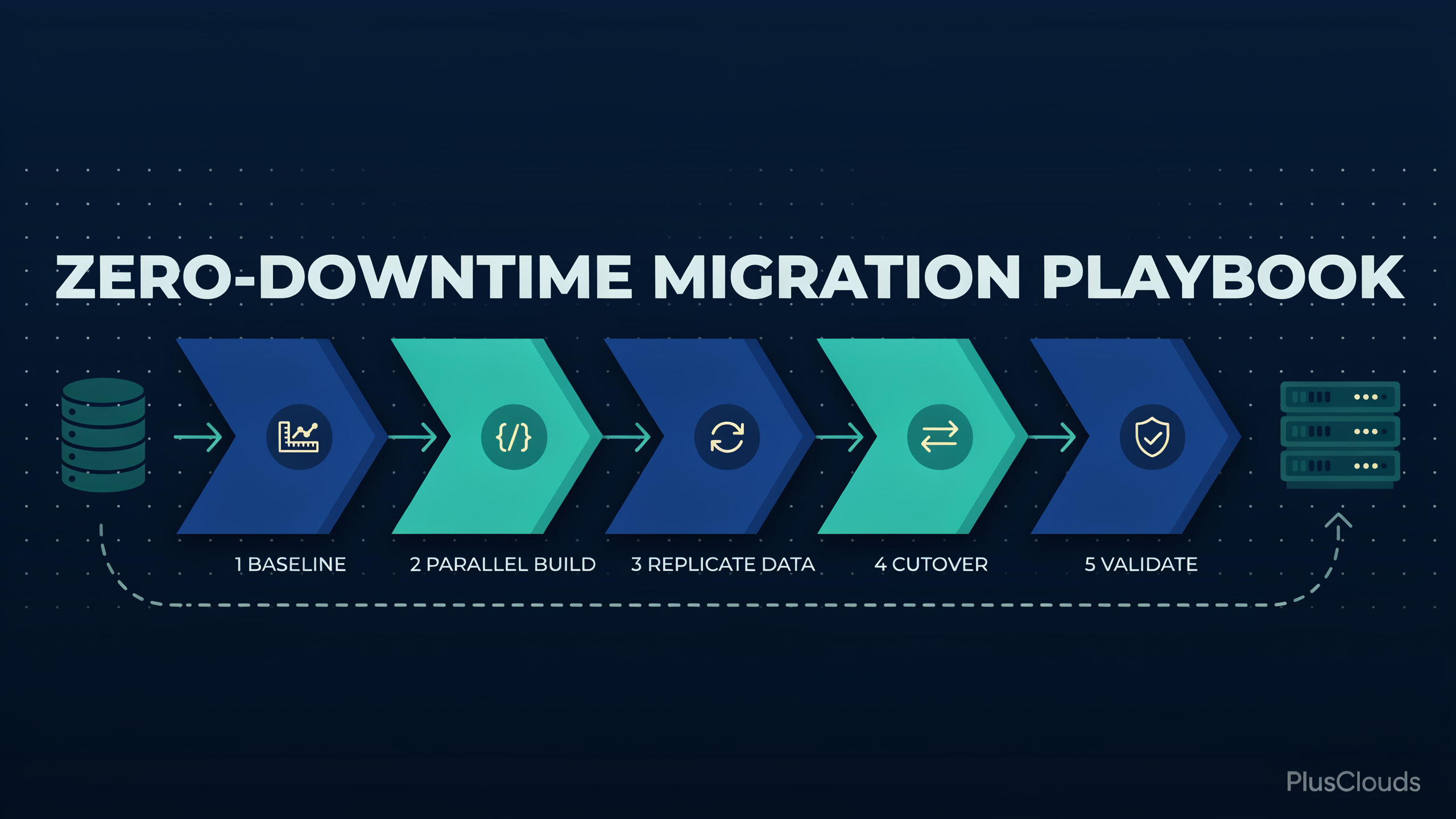
Repatriation failures almost always come from rushing the migration. Here is the sequence that works.
Step 1: Baseline before you move. Capture current performance metrics: p99 latency, throughput, cost per transaction. You need these to prove the move worked, both technically and financially.
Step 2: Stand up the destination in parallel. Provision the bare-metal environment, replicate networking and security controls, and validate them. Our zero trust layering guide covers how to replicate firewall, WAF, and segmentation controls without adding complexity.
Step 3: Replicate data continuously. Use native replication (database streaming, object storage sync) to keep a near-real-time copy at the destination. For large datasets, consider physical transport for the initial seed; a 50 TB dataset at typical cloud egress rates can cost more to download than a flight with a suitcase full of drives.
Step 4: Cut over with a rollback path. Switch writes to the new environment during a low-traffic window, keep the cloud environment running as a hot fallback for at least a week, and define explicit rollback triggers.
Step 5: Validate, then decommission. Compare performance against your baseline. Only after a full business cycle (including month-end and peak periods) should you tear down the cloud environment. Then, and only then, collect your exit savings.
A detailed version of this playbook, with cost-and-performance checkpoints, lives in our hyperscaler-to-bare-metal migration guide.
How to Build an Ongoing Workload Review Process
Repatriation is not a one-time project. Hardware economics, workload patterns, and regulations all shift, so the placement decision needs to be revisited.
Build a lightweight quarterly review:
- Tag every workload with its consumption pattern (steady, spiky, batch), commitment horizon, and compliance class.
- Track cost per workload, not just cost per account. Unit economics only become visible at the workload level.
- Flag drift. A workload classified as "spiky" that has run at 70% utilization for six months is a repatriation candidate you are missing. A "steady" workload that has gone quiet might belong back in the cloud.
- Re-run the TCO math annually. Hardware prices, cloud pricing, and your own architecture all change.
Treat this like capacity planning, not cost cutting. The goal is that every workload sits on the infrastructure that fits it, and that the answer can change as the workload does.
Key Takeaways: Your Cloud Exit Strategy in One Page
- Cloud repatriation in 2026 is selective, not ideological. The winning pattern is hybrid by design: steady-state on dedicated hardware, elastic workloads in the cloud.
- The financial trigger is concrete: workloads running above roughly 65% sustained utilization with a three-year-plus horizon almost always cost less on dedicated infrastructure. GPUs reach that threshold fastest of all.
- Compliance and sovereignty are independent triggers. For regulated workloads, single-tenant infrastructure simplifies the evidence trail as much as it improves the economics.
- Databases, AI training, HPC, render pipelines, and steady-state backends are the proven candidates. CI/CD, staging, and experimental workloads should stay elastic.
- Migration succeeds on patience: parallel environments, continuous replication, explicit rollback paths, and a full business cycle of validation before decommissioning.
The teams getting this right are not abandoning the cloud. They are finally paying cloud prices only for cloud-shaped workloads, and owning the rest.
If you are evaluating where your repatriation candidates should land, PlusClouds Bare-Metal (X7000 for GPU and HPC workloads, Dell-certified Leo CN for on-premises deployment) and PlusClouds Cloud Servers with zero egress fees are built to run as one dual-mode estate from a single control plane. Take a look, run the math against your current bill, and see how much of it is paying for elasticity you never use.