Sales1 min read114 words

JavaScript ile basit bir şekilde arka plan değiştiren ufak uygulama geliştirelim

Emir Eskici

PlusClouds Author

Cloud & SaaS

JavaScript ile Arka Plan Renk Değiştirme Nasıl Yapılır
Size

JavaScript ile Arka Plan Değiştirici

Selamlar, bu blogda diğer bloglarda olduğu gibi sizlere ufak çaplı ama üstüne geliştirmeler yapabileceğiniz bir uygulama göstereceğim. JavaScript ile Arka Plan Değiştirici (Change the Background Color in JavaScript) sayesinde oldukça basit ve eğlenceli olan bu uygulamayı birlikte inceleyelim

wordpress6.2_Banner.jpg

Diğer projeler/uygulamalar için (bknz: Blog)

HTML

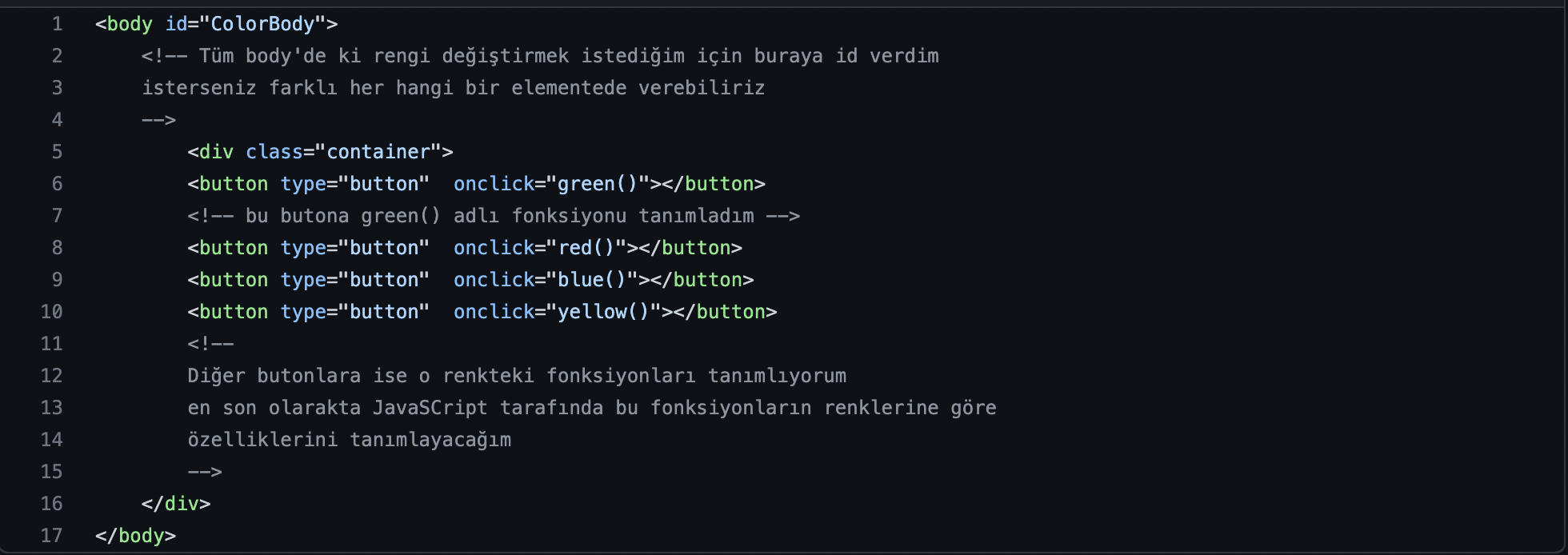
Bize istediğimiz renk seçeneklerini sunacak bir takım butonlar ve bu butonlara onClick özelliği vererek Html Tarafında işlemlerimizi halledelim öncellikle
Description

JS

Html kodlarımızda butonlara verdiğimiz onClick fonksiyonlarımızı tanımlayalım.

function green(){
    document.getElementById("ColorBody").style.backgroundColor="green"
}
// Basitçe Id'si ColorBody olan elementi seçtim ve stil(style) backgroundColor özelliği ile seçili olan elemente yeşil(green) rengini verdim
function red(){
    document.getElementById("ColorBody").style.backgroundColor="red"
}

function blue(){ document.getElementById("ColorBody").style.backgroundColor="blue" }

function yellow(){ document.getElementById("ColorBody").style.backgroundColor="yellow" }

Sonuç

Description

LeadOcean

Sales team chasing the wrong leads?

1.8B+ companies — search always free

Find My Leads →

No credit card · Cancel anytime

Frequently Asked Questions

Arka plan rengini değiştirmek için hangi HTML elemanı hedefleniyor?

ColorBody kimliğine sahip öğenin arka plan rengi değiştirilir. JavaScript fonksiyonları bu öğenin backgroundColor özelliğini ayarlayarak rengi değiştirir.

Arka plan rengini değiştirmek için hangi dört JavaScript fonksiyonu mevcut ve hangi renklere ayarlanıyor?

green, red, blue ve yellow adlı dört fonksiyon renkleri sırasıyla yeşil, kırmızı, mavi ve sarı olarak arka plana uygular.

HTML tarafında bu renk değişimini tetiklemek için ne yapılır?

Butonlara onClick özelliği eklenerek tetiklenir ve ilgili JavaScript fonksiyonları çalıştırılır.

ColorBody id'li öğe nasıl seçilir ve arka plan rengi nasıl değiştirilir?

ColorBody id’li öğe seçilir ve bu öğenin backgroundColor özelliği değiştirilerek renk uygulanır.

Kendi renk seçeneklerinizi eklemek için hangi adımlar gerekir?

Yeni renkler için ek fonksiyonlar yazılır ve bunlar HTML’deki uygun butonlara onClick ile bağlanır.

Kod örneğinde kullanılan renk değerleri nelerdir?

Renkler green, red, blue ve yellow olarak kullanılmıştır ve bu değerlerle arka plan rengi değiştirilir.

Bu yöntemi hangi amaçlar için kullanabilirsiniz?

Kullanıcıya renk seçenekleri sunmak ve basit bir arayüzle arka planı değiştirmek için kullanılabilir; ufak bir uygulama olarak gösterilmiştir.

Related Reading

Posts tagged with:

The 48-Hour Activation Window: How to Turn a Buying Signal into a Booked Meeting Before Your Competitor Even Sees It
Sales

The 48-Hour Activation Window: How to Turn a Buying Signal into a Booked Meeting Before Your Competitor Even Sees It

B2B buying signals decay fast, and most sales teams lose the advantage by waiting days to act. This guide breaks down how to build a 48-hour activation workflow using LeadOcean and Eaglet to turn raw intent signals into personalised, booked meetings before competitors even open their CRM.

How to Build a First-Party Intent Stack That Feeds LeadOcean: From Website Visitor to Verified Decision-Maker in One Workflow
Sales

How to Build a First-Party Intent Stack That Feeds LeadOcean: From Website Visitor to Verified Decision-Maker in One Workflow

Most B2B demand-generation teams ignore the buying signals already embedded in their own website, content, and product analytics. This guide explains how to build a first-party intent stack that resolves anonymous visitor traffic into verified decision-maker contacts, applies composite intent scoring, and routes high-intent accounts into HubSpot or Salesforce automatically using LeadOcean and Eaglet by PlusClouds.

Signal-First Outbound: How to Build a Personalized-at-Scale Prospecting System That Gets 18 % Reply Rates
Sales

Signal-First Outbound: How to Build a Personalized-at-Scale Prospecting System That Gets 18 % Reply Rates

B2B inboxes in 2026 are overwhelmed with generic cold email, pushing market-wide reply rates below 2%. This guide explains how to build a signal-first, personalized-at-scale outbound system that consistently achieves 18% reply rates by triggering outreach on real buying events and using AI-powered enrichment tools like LeadOcean and Eaglet.

Dark Funnel Prospecting: How to Detect and Reach B2B Buyers Before They Ever Fill Out a Form
Sales

Dark Funnel Prospecting: How to Detect and Reach B2B Buyers Before They Ever Fill Out a Form

The dark funnel accounts for roughly 70% of the B2B buyer journey before any prospect fills out a form, meaning most pipeline opportunities are invisible to standard marketing automation. This guide explains how to detect reliable buying signals, avoid false-positive intent data, and build a workflow that gets your outreach in front of the right buyer at the right moment.