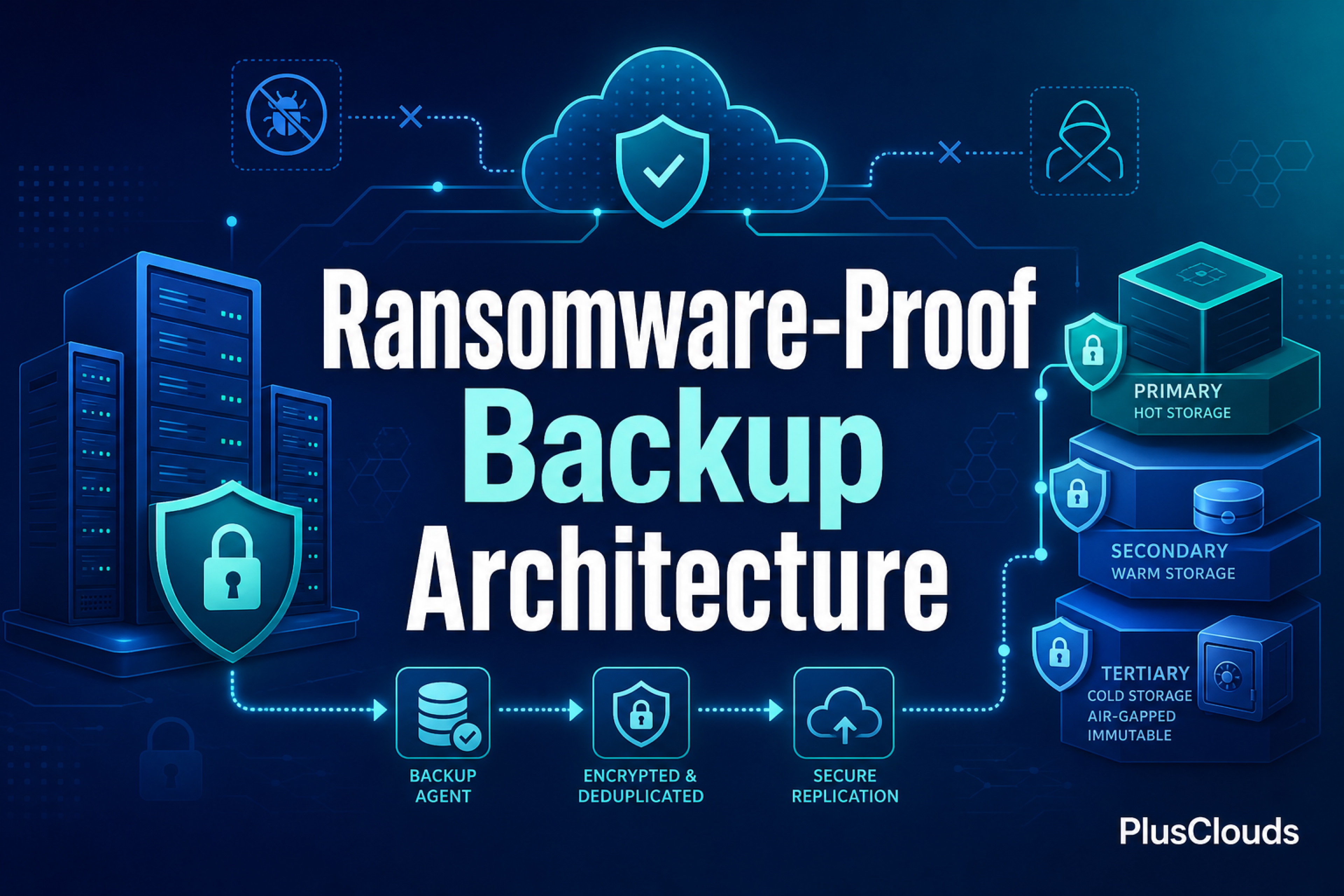
Your backup job completed successfully at 2:47 AM. You check the logs, see the green checkmark, and move on with your morning. Three weeks later, ransomware encrypts your production environment and every backup copy attached to the same network. The green checkmarks meant nothing. The backups were there, but they were not safe.
This scenario plays out more often than most IT teams admit. The classic 3-2-1 backup rule served organizations well for over a decade, but ransomware operators have spent that same decade learning exactly how backup systems work. They target them deliberately. In 2026, a backup strategy built on 3-2-1 alone is not a safety net. It is a false sense of security.
This guide walks you through the 3-2-1-1 backup architecture: what it means, how to implement it on cloud infrastructure, and how to map it against NIS2, DORA, GDPR, and SOC 2 requirements so your next audit goes smoothly.
Key Takeaways
- The 3-2-1-1 backup rule adds one immutable, air-gapped copy to the classic 3-2-1 framework, the only copy ransomware cannot reach even after a full credential compromise.
- WORM (Write Once Read Many) storage enforced at the storage layer is the technical foundation of immutability. Application-layer "read-only" flags do not qualify.
- RPO and RTO targets must be documented per workload tier, automated, and regularly tested to satisfy NIS2, DORA, GDPR Article 32, and SOC 2 Type II requirements.
- Modern ransomware operators deliberately target backup agents, cloud storage credentials, and snapshot schedules during a dwell period that can last weeks before encryption begins.
- Recovery tests must produce auditor-ready records: timestamps, integrity verification results, actual RTO, and engineer sign-off, retained for a minimum of three years.
Table of Contents
- Why the Classic 3-2-1 Backup Rule Is No Longer Enough in 2026
- What the 3-2-1-1 Backup Rule Actually Means (and What Each Component Does for You)
- Ransomware Anatomy: How Attackers Target Backup Environments
- Choosing the Right Storage Tier for Each Backup Copy (NVMe, SSD, HDD)
- How to Configure Automated Backup with Explicit RPO and RTO Targets
- Immutable Backup Copies: How Air-Gapped and WORM Storage Stops Ransomware Encryption
- Recovery Testing and Audit Evidence: From Scheduled Drills to Auditor-Ready Reports
- Compliance Mapping: NIS2, DORA, GDPR, and SOC 2 Requirements Your Backup Architecture Must Meet
- Step-by-Step Implementation Checklist for a 3-2-1-1 Cloud Backup Stack
- Building Ransomware Resilience Is an Architecture Decision, Not a Product Decision
Why the Classic 3-2-1 Backup Rule Is No Longer Enough in 2026
The original 3-2-1 rule, popularized by photographer Peter Krogh and later adopted by CERT and countless IT frameworks, is straightforward: keep 3 copies of your data, on 2 different media types, with 1 copy offsite. For most of the 2000s and 2010s, that was solid advice.
The problem is that ransomware groups have industrialized. Modern ransomware families specifically hunt for backup software agents, NAS shares, and cloud-connected storage buckets before triggering encryption. They spend days or weeks inside a network before detonating, deliberately waiting for backup cycles to overwrite clean restore points with encrypted data. By the time you notice the attack, your "offsite" copy is either encrypted too or contains corrupted data that has been replicated faithfully across all three copies.
According to backup and recovery research tracking 2026 priorities, immutability and air-gapped storage have moved from nice-to-have features to baseline requirements for any organization serious about ransomware recovery. The 3-2-1 rule never accounted for an attacker who has already compromised your backup credentials.
There is also the regulatory dimension. NIS2, which became enforceable across EU member states in late 2024, and DORA, which applies to financial entities from January 2025, both require demonstrable recovery capabilities with documented Recovery Time Objectives (RTO) and Recovery Point Objectives (RPO). A backup that exists but cannot be proven to work does not satisfy an auditor. The architecture needs to change.
What the 3-2-1-1 Backup Rule Actually Means (and What Each Component Does for You)
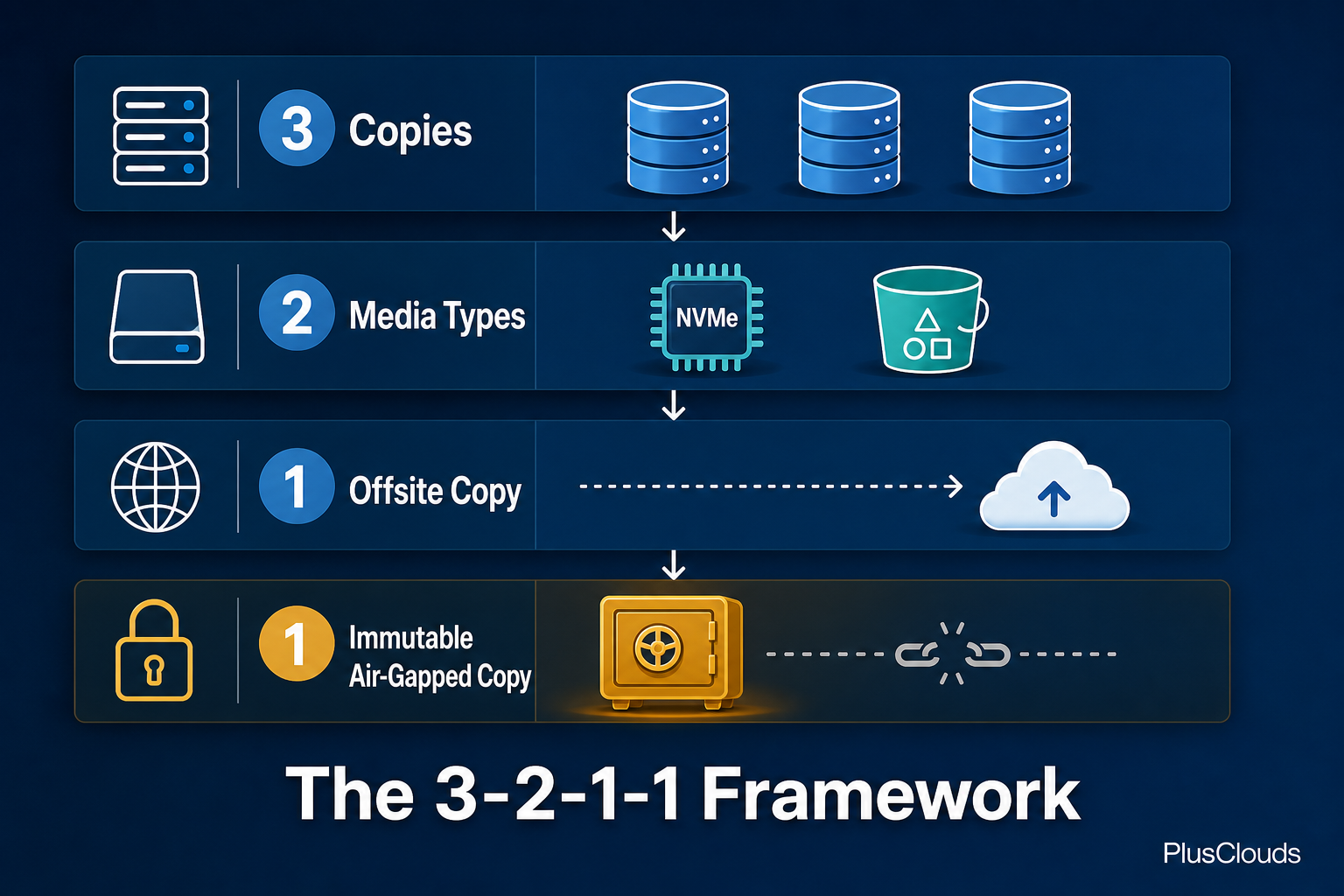
The 3-2-1-1 rule extends the classic framework with one critical addition. Here is how each component breaks down:
- 3 copies of your data: your production data plus two backups. Not two copies total. Three.
- 2 different storage media types: for example, NVMe block storage for your primary backup and object storage or tape for the secondary. Media diversity prevents a single vendor failure or format-specific bug from wiping everything.
- 1 offsite copy: stored in a geographically separate location from your primary infrastructure. A cloud region in a different country qualifies. A second rack in the same data center does not.
- 1 immutable, air-gapped copy: this is the new addition, and it is the one that actually stops ransomware. This copy cannot be modified, deleted, or encrypted by any process, user, or attacker who has compromised your environment. It sits outside the blast radius.
The final "1" is what separates a modern backup architecture from one that looks good on paper but fails under attack. Immutability means write-once, read-many (WORM) storage where no API call, no admin credential, and no ransomware payload can alter or delete the data once written. Air-gapping means the copy has no persistent network connection to your primary environment.
Together, these two properties guarantee that even if an attacker fully compromises your cloud account, your production servers, your backup agents, and your offsite replica, there is still one copy they cannot touch.
Ransomware Anatomy: How Attackers Target Backup Environments
Understanding the attack pattern is necessary before you can architect a defense. Ransomware operators who target businesses do not simply detonate on day one. A typical enterprise ransomware intrusion follows a predictable sequence.
First, initial access. This usually comes through phishing, exposed RDP, or a vulnerability in a public-facing application. Once inside, the attacker moves laterally, escalating privileges quietly. This dwell time averages weeks to months before encryption begins.
During that dwell period, attackers specifically look for backup infrastructure. They identify backup agents running on servers, map connected storage volumes, locate cloud storage credentials in environment variables or configuration files, and enumerate snapshot schedules. Their goal is to either delete backups directly, encrypt them alongside production data, or corrupt them in a way that is not immediately obvious.
Some ransomware variants specifically target backup software APIs. Others simply wait for enough backup cycles to pass that all restore points contain encrypted data. A 30-day retention window sounds generous until you realize the attacker has been inside for 45 days.
This is why the architecture matters. Backups that are network-accessible, even read-write restricted, are still potentially reachable if credentials are compromised. Only a copy that is physically or logically disconnected from your environment, with immutable storage properties enforced at the storage layer rather than the application layer, survives this attack pattern reliably.
Hardening your backup environment also means hardening the servers that run backup jobs. If you are running workloads on Cloud Servers by PlusClouds, you have full root access and the ability to isolate backup agents on dedicated instances with tightly scoped network access, reducing the lateral movement surface significantly.
Choosing the Right Storage Tier for Each Backup Copy (NVMe, SSD, HDD)
Not every backup copy needs to be on the fastest storage available. Matching storage tier to recovery priority is both a cost optimization and an architectural decision.
NVMe storage is appropriate for your most recent backup copy, the one you will reach for first in a recovery scenario. Fast restore times directly reduce your RTO. If your RTO target is under four hours, you need your primary backup on NVMe or high-performance SSD. Restoring 2TB from spinning disk at 150 MB/s takes hours. Restoring from NVMe at 3,000+ MB/s is a different conversation.
SSD storage works well for your secondary copy, the one held offsite or in a separate cloud region. It balances cost against reasonable recovery performance for scenarios where the primary backup is unavailable.
HDD or object storage is the right tier for your immutable archive copy. This copy is your last resort, not your first call. Recovery from it may take longer, but that is acceptable because you only reach for it when everything else has failed. The priority here is durability and immutability, not speed. Object storage with WORM policies enabled, or cold archive tiers offered by major cloud providers, fits this role well.
Cloud Storage by PlusClouds spans all three tiers, NVMe, SSD, and HDD, from a single control plane. That matters practically: you can configure your 3-2-1-1 architecture without managing three separate vendor relationships or three different APIs.
How to Configure Automated Backup with Explicit RPO and RTO Targets
RPO (Recovery Point Objective) defines how much data loss you can tolerate, measured in time. If your RPO is four hours, you need a backup taken at least every four hours. RTO (Recovery Time Objective) defines how quickly you must be back online after a failure. These are not aspirational numbers. They are contractual commitments in most compliance frameworks.
Setting RPO and RTO targets requires honest conversation about business impact. A database processing financial transactions has a very different RPO than a static marketing website. Start by classifying your workloads:
- Tier 1 (critical): RPO under 1 hour, RTO under 4 hours. Databases, authentication services, payment systems.
- Tier 2 (important): RPO 4-8 hours, RTO under 24 hours. Application servers, internal tools, CRM data.
- Tier 3 (standard): RPO 24 hours, RTO 48-72 hours. Dev/test environments, archives, non-production systems.
Once you have your tiers, configure automated backup schedules to match. A Tier 1 workload needs hourly snapshots at minimum, with transaction log backups running continuously if your database supports it. Here is a simplified example of how you might schedule this using a cron-based backup agent:
# Tier 1: hourly snapshot, retained for 72 hours
0 * * * * /usr/local/bin/backup-agent snapshot --target prod-db-01 --retention 72h

# Daily full backup at 01:00, retained for 30 days
0 1 * * * /usr/local/bin/backup-agent full --target prod-db-01 --retention 30d

# Weekly backup to immutable storage, retained for 1 year
0 2 * * 0 /usr/local/bin/backup-agent archive --target prod-db-01 --storage immutable --retention 365d
The key discipline here is that RPO and RTO targets must be documented, tested, and tracked. Automation handles the scheduling, but you need SLA dashboards showing whether backups completed on time and whether recovery tests met their RTO. Automated Backup by PlusClouds includes explicit RPO/RTO target configuration and SLA tracking, so you have the audit trail built in rather than bolted on afterward.
Immutable Backup Copies: How Air-Gapped and WORM Storage Stops Ransomware Encryption
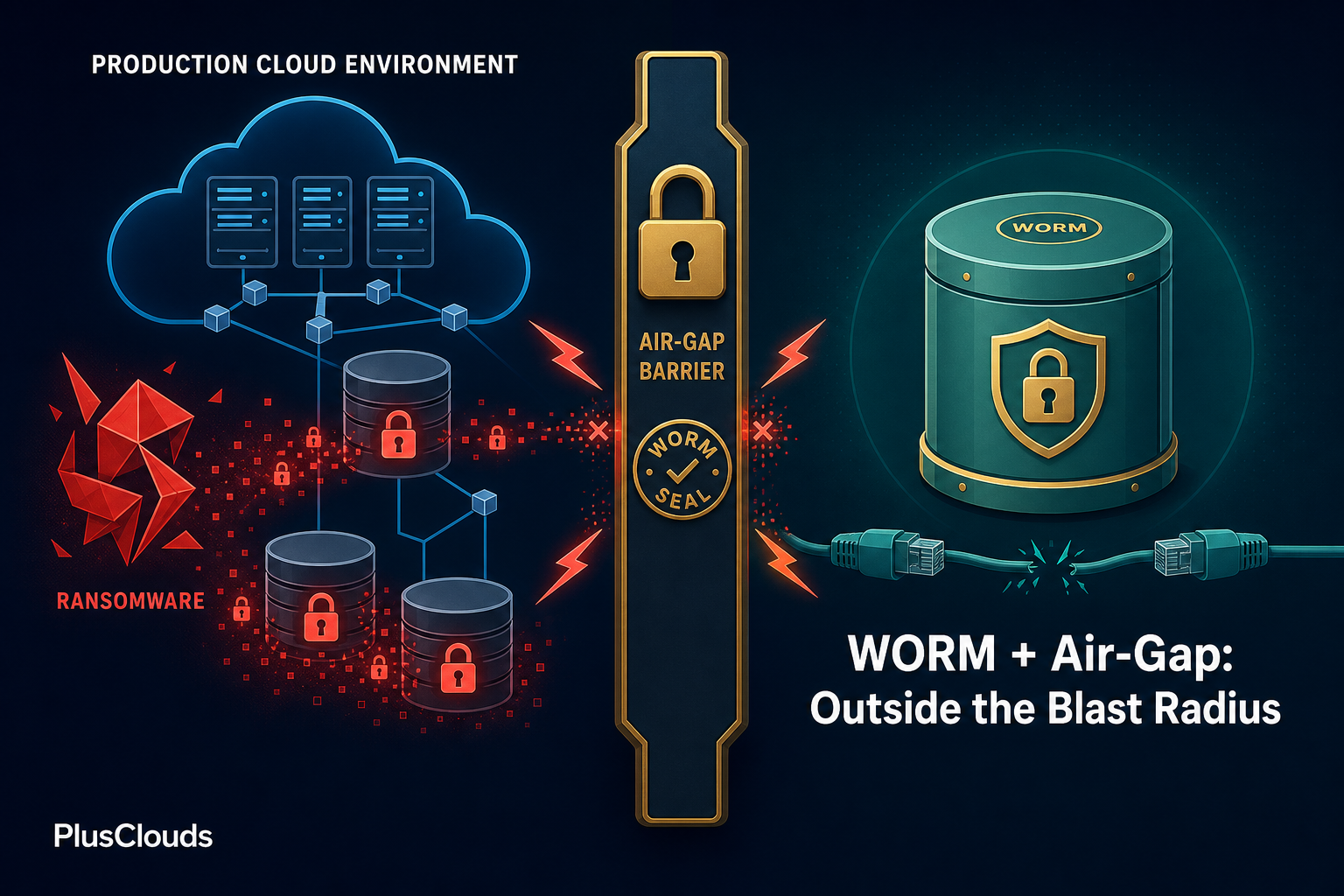
Immutability is enforced at the storage layer, not the application layer. This distinction is critical. An application-layer "read-only" flag can be changed by anyone with sufficient permissions, including an attacker who has stolen admin credentials. Storage-layer immutability, implemented through WORM (Write Once Read Many) policies, cannot be overridden by any API call or credential, including root.
WORM storage works by locking objects for a defined retention period at the time of write. During that period, no process can modify or delete the object. The lock is enforced by the storage system itself, not by access control policies that can be modified.
Air-gapping takes this further by removing the network path entirely. A true air-gap means no persistent connection between your production environment and the backup copy. In cloud environments, this is typically implemented through:
- Object lock with governance or compliance mode: AWS S3 Object Lock, Azure Immutable Blob Storage, and equivalent services enforce WORM at the storage API level.
- Periodic offline export: snapshots exported to cold storage with no active mount point.
- Separate cloud account with no cross-account write permissions: the backup account can receive data via a one-way push, but production credentials cannot delete or modify objects in the backup account.
The combination of WORM policy and account isolation is the practical cloud equivalent of an air-gap. An attacker who has fully compromised your production cloud account still cannot reach objects in a separate account where they have no credentials and where the objects are locked at the storage layer.
For environments handling sensitive data under GDPR, note that immutable storage requires careful planning around the right to erasure. You need a documented process for handling erasure requests against immutable copies, typically through pseudonymization at ingest rather than deletion after the fact.
Recovery Testing and Audit Evidence: From Scheduled Drills to Auditor-Ready Reports
A backup that has never been tested is not a backup. It is a hypothesis. The only way to know your recovery architecture works is to use it, deliberately, before you need it under pressure.
Recovery testing has two forms: restore tests and full recovery drills. Restore tests verify that individual files, databases, or VM snapshots can be successfully recovered to a known-good state. They should run at least monthly for Tier 1 workloads. Full recovery drills simulate a complete environment failure and measure actual RTO against your target. These should run quarterly.
For auditor-ready evidence, each test needs a documented record that includes:
- Date and time of the test
- Workload tested and backup copy used
- Recovery start time and completion time (actual RTO)
- Data integrity verification method (checksum comparison, application-level smoke test)
- Pass/fail result and any remediation actions taken
- Signature or approval from the responsible engineer
Automated recovery testing, where a scheduled job spins up a recovery environment, runs integrity checks, and logs the result without human intervention, is the gold standard. It removes the "we meant to test but it kept getting deprioritized" problem that causes recovery failures in real incidents.
Keep these records for a minimum of three years. NIS2 and DORA both require organizations to demonstrate ongoing recovery capability, not just a one-time architecture review.
Compliance Mapping: NIS2, DORA, GDPR, and SOC 2 Requirements Your Backup Architecture Must Meet
Compliance frameworks do not prescribe specific backup technologies, but they do mandate outcomes that your architecture must deliver. Here is how the 3-2-1-1 model maps to the major frameworks:
NIS2 (EU Network and Information Security Directive 2): Requires essential and important entities to implement backup management, business continuity measures, and incident response capabilities. Article 21 specifically calls for documented recovery procedures with tested RTO/RPO targets. Your immutable copy and automated recovery testing directly satisfy this requirement.
DORA (Digital Operational Resilience Act): Applies to financial services entities in the EU. Requires ICT business continuity policies with defined recovery objectives, regular testing of backup and recovery procedures, and documentation of testing results. DORA also requires that third-party ICT providers (including cloud providers) meet resilience standards, so your cloud backup vendor's own compliance posture matters.
GDPR (General Data Protection Regulation): Requires appropriate technical measures to ensure data availability and resilience. Article 32 mandates the ability to restore availability of personal data in a timely manner after an incident. Your Tier 1 RTO targets and immutable copies directly address this. The complication, as noted above, is reconciling immutability with erasure rights under Article 17.
SOC 2 Type II: The Availability trust service criterion requires documented backup procedures, testing evidence, and monitoring. Type II certification requires evidence of operating effectiveness over a period of time, typically six to twelve months, so your automated test logs and SLA dashboards are not optional extras. They are the audit artifacts.
The Cloud Security offering from PlusClouds includes ISO 27001, SOC 2, and GDPR compliance documentation, which simplifies the vendor assessment portion of your audit. Your auditor needs to verify not just your backup architecture but the compliance posture of the infrastructure it runs on.
Step-by-Step Implementation Checklist for a 3-2-1-1 Cloud Backup Stack
Use this checklist to build or audit your backup architecture. Each item maps to a section covered in this guide.
Classify and document workloads:
- Assign every production workload to Tier 1, 2, or 3
- Define RPO and RTO targets per tier in writing
- Get sign-off from business stakeholders on those targets
Configure your three copies:
- Primary backup on NVMe or high-performance SSD, co-located with production for fast restore
- Secondary backup on SSD in a separate cloud region or availability zone
- Immutable archive copy on WORM-enabled object storage in a separate cloud account
Enforce immutability:
- Enable object lock (compliance mode, not governance mode) on your archive storage
- Verify that no production credentials have delete or modify permissions on the archive account
- Set minimum retention periods aligned to your compliance requirements (typically 1-7 years)
Automate backup jobs:
- Schedule backups at frequencies matching your RPO targets per tier
- Configure alerting for missed or failed backup jobs
- Enable SLA tracking to measure actual backup completion against schedule
Harden the backup environment:
- Run backup agents on isolated instances with no unnecessary inbound network access
- Rotate backup credentials on a schedule and store them in a secrets manager
- Enable multi-factor authentication on all accounts with access to backup infrastructure
Test and document recovery:
- Run monthly restore tests for Tier 1 workloads
- Run quarterly full recovery drills with measured RTO
- Store test records with timestamps, results, and engineer sign-off for a minimum of three years
Map to compliance requirements:
- Document your backup architecture in your information security policy
- Map each backup component to the relevant NIS2, DORA, GDPR, or SOC 2 control
- Include backup testing evidence in your annual audit package
The architecture described in this checklist is not theoretical. It is the pattern that organizations recovering successfully from ransomware attacks in 2025 and 2026 have in common, as enterprise backup resilience research consistently confirms.
Building Ransomware Resilience Is an Architecture Decision, Not a Product Decision
The 3-2-1-1 rule is a framework, not a product. No single tool automatically makes your backups ransomware-proof. What makes them resilient is deliberate architectural choices: tiered storage matched to recovery priority, immutability enforced at the storage layer, automation that removes human error from the backup schedule, and regular testing that proves the system works before you need it.
The compliance angle reinforces the architecture. NIS2 and DORA do not give organizations the option to treat backup testing as a low-priority task. Documented, tested, and auditable recovery capabilities are now a legal requirement for a significant portion of European businesses, and that requirement is being enforced.
If you are ready to move from a 3-2-1 posture to a genuinely ransomware-resilient 3-2-1-1 architecture, Automated Backup by PlusClouds gives you the RPO/RTO configuration, SLA tracking, and remote restore capabilities to get there without building the tooling from scratch. Pair it with Cloud Storage by PlusClouds for tiered NVMe, SSD, and HDD storage across a single control plane, and you have the infrastructure layer of your 3-2-1-1 stack covered. The architecture decisions are yours. The infrastructure to support them is ready when you are.