
- Why Email Remains the #1 B2B Lead Generation Channel
- What Makes a B2B Lead Generation Email Template Work?
- Template 1: The Classic Cold Outreach Email
- Template 2: The Problem-First Email
- Template 3: The Mutual Connection Email
- Template 4: The Trigger-Based Email
- Template 5: The Value-First Email
- Template 6: The Competitor Comparison Email
- Template 7: The Case Study Email
- Template 8: The Re-Engagement Email
- Template 9: The LinkedIn + Email Combo
- Template 10: The "Just Checking In" Follow-Up Email
- Template 11: The "Personalized AI-Written" Email
- How AI Is Transforming B2B Lead Generation Email Outreach
- LeadOcean and Eaglet: The B2B Outbound Stack by PlusClouds
- Do You Need the Eaglet Add-on, or Just LeadOcean?
- Best Practices for B2B Lead Generation Email Campaigns
- Putting It All Together: Your B2B Email Outreach System
- Final Thoughts
Cold email is still one of the highest-ROI channels in B2B sales but only when done right. The wrong template, the wrong tone, or the wrong timing can get you instantly deleted, unsubscribed, or worse, marked as spam. The right B2B lead generation email template, on the other hand, can open doors to enterprise deals, strategic partnerships, and a pipeline that never runs dry.
In this guide, we break down 11 battle-tested B2B lead generation email templates, explain what makes each one work, and show you how modern AI tools, like Eaglet and LeadOcean by PlusClouds, can automate the entire process so your outreach runs 24/7, even while you sleep.
Why Email Remains the #1 B2B Lead Generation Channel
Before we get to the templates, let's establish why email still dominates in B2B outreach:
Direct access to decision-makers. Unlike social ads or SEO, a well-crafted cold email lands directly in the inbox of the person who holds the budget.
Scalable and measurable. You can A/B test subject lines, track open rates, and optimize your conversion funnel with precision.
High ROI. Email marketing consistently delivers some of the highest returns of any marketing channel, especially in B2B contexts where deal sizes are large.
Personalization at scale is now possible. Thanks to AI, you can send 500 hyper-personalized emails without writing each one manually.
The challenge is no longer "should I use email?" but rather "what should I say, and how do I send it at scale without losing personalization?"
That's exactly what this article answers.
What Makes a B2B Lead Generation Email Template Work?
Before diving into the templates, understand the anatomy of a high-converting cold email:
- A subject line that earns the open. It should be specific, curiosity-driven, and ideally personalized. Generic subject lines like "Partnership Opportunity" get ignored.
- An opener that's about them, not you. Start with something relevant to the prospect's business, a recent news item, a challenge their industry faces, or a specific observation about their company.
- A clear value proposition. In one or two sentences, explain what problem you solve and why it matters to them specifically.
- Social proof or credibility. A client name, a result metric, or a recognizable brand you've worked with builds instant trust.
- A low-friction call to action (CTA). Don't ask for a 45-minute demo in the first email. Ask for a 10-minute call, a yes/no, or a quick reply.
- A short, professional signature. Include your name, title, company, and optionally a link to your website or LinkedIn.
Now let's get into the templates.
Template 1: The Classic Cold Outreach Email
Best for: Reaching new prospects with no prior relationship. Subject: Quick question about [Company Name]'s [specific challenge]
Hi [First Name],
I came across [Company Name] while researching [industry/sector], and I noticed that you're [specific observation — e.g., "scaling your sales team rapidly" or "expanding into European markets"].
We help [type of companies] [achieve specific outcome] — typically within [timeframe]. One of our recent clients, [Client Name], saw [specific result, e.g., "a 40% increase in qualified pipeline within 60 days"]. Would it make sense to have a quick 10-minute call this week to see if there's a fit?
Best, [Your Name] [Title] | [Company] [Phone] | [Website]
Why it works: It's short, specific, and leads with a relevant observation rather than a sales pitch. The social proof adds credibility without overwhelming the reader.
Template 2: The Problem-First Email
Best for: Prospects in industries with well-known pain points. Subject: [Industry] teams are losing X hours/week to [specific problem]
Hi [First Name],
Most [industry] companies I speak with struggle with [common pain point — e.g., "manually qualifying inbound leads" or "coordinating cross-team sales handoffs"].
The result? [Consequence: e.g., "Reps spend 60% of their time on non-selling activities, and the pipeline suffers."]
[Your Company] fixes this by [brief explanation of solution]. Companies like [Client A] and [Client B] use us to [key benefit].
Are you currently dealing with this, or have you found a way around it? Happy to share what's been working for others in your space.
[Your Name]
Why it works: It leads with empathy and a real problem. The question at the end invites a genuine reply rather than a yes/no, which is harder to ignore.
Template 3: The Mutual Connection Email
Best for: When you share a LinkedIn connection, an event attendee list, or a community with the prospect. Subject: [Mutual Contact] suggested I reach out
Hi [First Name],
[Mutual Contact's Name] mentioned that you're looking into [relevant topic or challenge] — and thought it might be worth us connecting.
I lead [role] at [Company], where we help [target audience] [achieve outcome]. We recently worked with [similar company] to [specific result].
Given what [Mutual Contact] shared, I think there could be a strong fit. Would you be open to a brief call to explore?
[Your Name]
Why it works: Social proof from a trusted contact dramatically increases open and reply rates. Even a weak connection ("we both attended the same webinar") can be enough to differentiate your email.
Template 4: The Trigger-Based Email
Best for: Reaching out after a specific business event (funding round, hiring spike, new product launch, news mention). Subject: Congrats on the [Series B / new product launch / expansion] — quick thought
Hi [First Name],
Congrats on [specific trigger event — e.g., "the recent Series B round" or "the launch of [Product Name]"]. That's a big milestone.
Companies at this stage often face [challenge relevant to the trigger — e.g., "rapid scaling of their sales outreach without inflating headcount"]. We've helped companies like [similar company] navigate exactly this.
Would it be worth a quick conversation? I have a few ideas specific to where [Company Name] is headed that I'd love to share.
[Your Name]
Why it works: Timing is everything. A trigger-based email feels timely and relevant, not random. It signals that you've done your homework.
Template 5: The Value-First (Give Before You Ask) Email
Best for: High-value prospects where you want to stand out from the noise. Subject: A resource that might help [Company Name]'s [specific initiative]
Hi [First Name],
I put together a short [guide / checklist / case study] on [topic directly relevant to their business], and your name came to mind while writing it.
[One-sentence description of what the resource covers and the specific value it delivers.]
Happy to send it over — no strings attached. And if it sparks any questions, I'm always up for a quick chat.
[Your Name] [Company]
Why it works: Leading with value, not a pitch, builds goodwill and positions you as an expert rather than a vendor. Replies to this type of email tend to be warmer and more engaged.
Template 6: The Competitor Comparison Email
Best for: Prospects you know are using a competing solution. Subject: How [Company Name] compares to what you're using now
Hi [First Name],
I noticed [Company Name] is currently using [Competitor Name] for [use case]. Many teams we talk to made the switch to [Your Company] after running into [specific limitation — e.g., "high per-seat pricing" or "limited CRM integrations"].
We typically offer [key differentiator] — which means [specific benefit].
I'm not here to bash [Competitor Name]. But if you've ever been curious about alternatives, I'd be happy to walk you through a side-by-side comparison. Takes about 15 minutes.
Interested?
[Your Name]
Why it works: It's specific and confident without being aggressive. Acknowledging the competitor by name shows you understand their current situation and aren't pitching blind.
LeadOcean
Start generating leads free
Template 7: The Case Study Email
Best for: Prospects in the same industry or facing the same challenge as an existing customer. Subject: How [Similar Company] achieved [specific result] in [timeframe]
Hi [First Name],
I wanted to share a quick story about [Similar Company], a [industry] business similar to [Prospect Company].
They came to us with [specific challenge]. Within [timeframe], they [specific result — e.g., "generated 320 qualified leads and closed 12 new accounts"].
I think [Prospect Company] could see similar results given [specific reason — e.g., "your target market and go-to-market motion look very similar"].
Would you be open to a 15-minute call to explore if this approach makes sense for you?
[Your Name]
Why it works: Concrete results from a comparable company are more persuasive than any feature list. Prospects can immediately envision the same outcome for themselves.
Template 8: The Re-Engagement Email
Best for: Dormant prospects or leads that went cold after initial contact. Subject: Checking back in — still relevant?
Hi [First Name],
I reached out a few months ago about [topic], but the timing may not have been right.
A lot has changed since then — we've [new development: e.g., "added [Feature]", "worked with [notable client]", or "launched a new integration with [tool they use]"].
Is [original pain point] still something on your radar? If so, I'd love to reconnect and share what's new.
Either way, no pressure — just wanted to check in.
[Your Name]
Why it works: It's humble, non-pushy, and acknowledges that the timing may have been off. The "new development" angle gives the prospect a fresh reason to engage.
Template 9: The LinkedIn + Email Combo
Best for: Multi-channel sequences where you've already made contact on LinkedIn. Subject: Following up from LinkedIn, [First Name]
Hi [First Name],
I sent you a connection request on LinkedIn last week — I wanted to follow up here in case email is a better channel for you.
I lead [role] at [Company]. We specialize in helping [target audience] [achieve outcome]. Given your work at [Company Name] in [department], I thought there might be a strong fit.
Would you be open to a 10-minute intro call? I'll keep it focused and respect your time.
[Your Name]
Why it works: Multi-touch sequences significantly increase reply rates. Referencing the LinkedIn connection adds familiarity and signals that you're not just blasting a list.
Template 10: The "Just Checking In" Follow-Up Email
Best for: Following up after a proposal, demo, or previous conversation. Subject: Following up on [topic] — any thoughts?
Hi [First Name],
I wanted to follow up on [proposal / demo / our last conversation] from [timeframe].
I know things get busy, so I'll keep this short: [One sentence restating the core value or next step].
Is this still something you'd like to move forward with? If circumstances have changed, just let me know — I completely understand.
Either way, happy to help however I can.
[Your Name]
Why it works: It's professional and respectful, not pushy. Giving the prospect an easy out ("if circumstances have changed") paradoxically increases the likelihood of a reply.
Template 11: The "Personalized AI-Written" Email (The New Standard)
Best for: High-volume outreach where personalization is generated by AI based on company data. Subject: One thing I noticed about [Company Name]
Hi [First Name],
I was researching [Company Name] for [reason — e.g., "a report on scaling SaaS companies in [Region]"] and noticed [specific, AI-generated insight about the company — e.g., "you recently expanded your enterprise offering but your website doesn't seem to reflect that yet"].
That's exactly the kind of gap we help [similar companies] close — [brief description of how].
[Client Name] ran into the same situation and [specific result] after working with us for [timeframe].
Would 15 minutes this week be feasible to connect?
[Your Name]
Why it works: This is the next evolution of cold email. With AI tools, this level of personalization — referencing a specific observation about each company — can now be generated automatically and sent at scale.
How AI Is Transforming B2B Lead Generation Email Outreach
Now, who are you going to mail these templates to? Writing 11 templates is one thing. Sending thousands of personalized emails (each tailored to the right prospect at the right time) is another challenge entirely. This is where AI-powered automation changes everything.
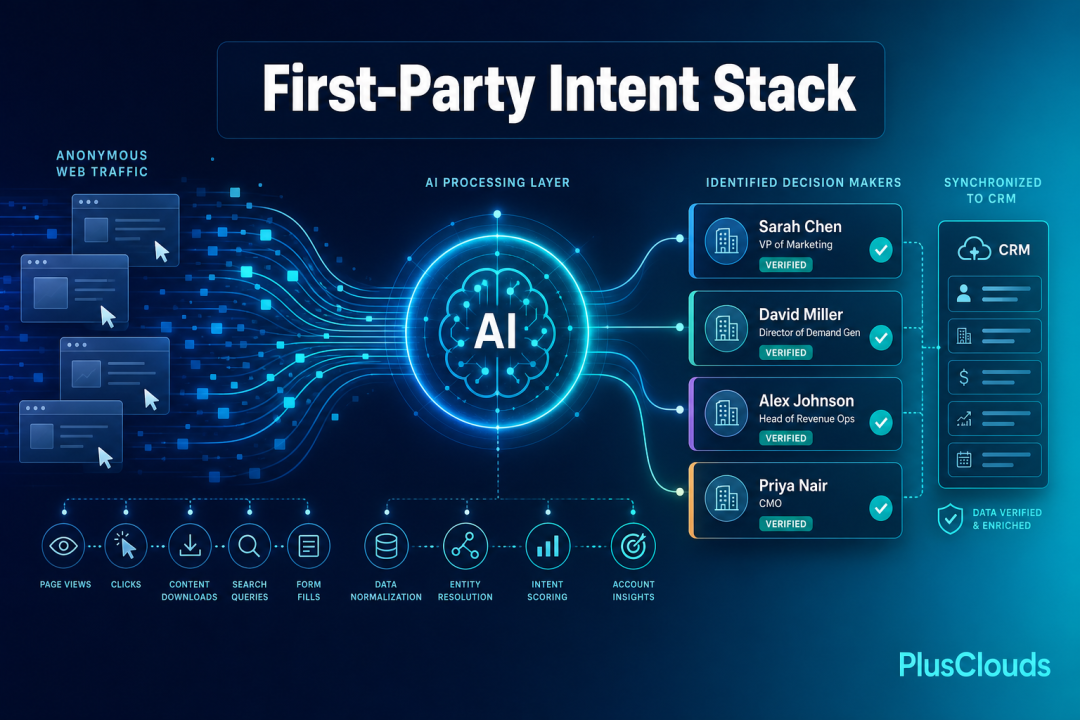
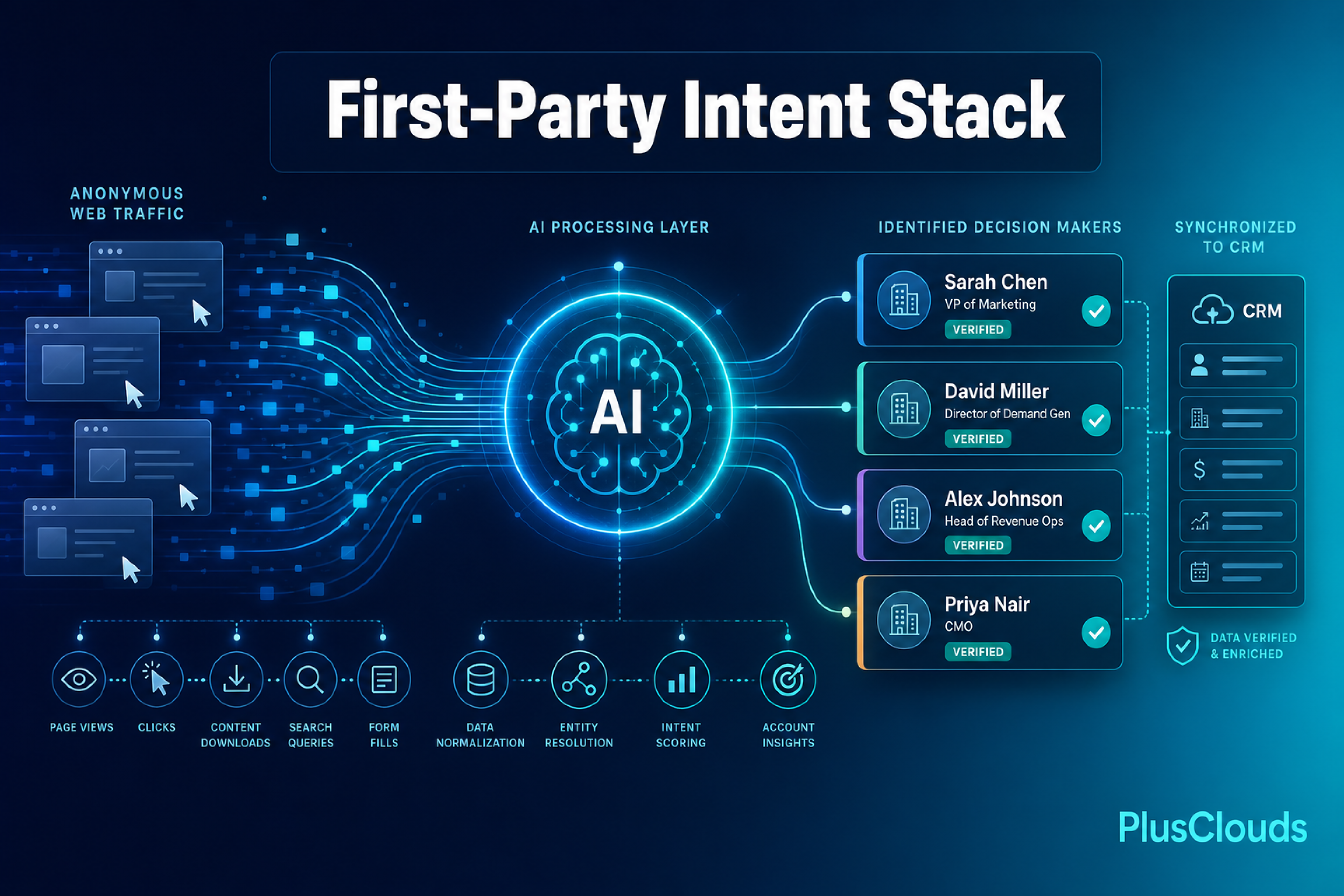
Modern AI platforms don't just store contacts. They identify your ideal customers, research them automatically, write personalized emails, send them at optimal times, and even book meetings directly into your calendar, all without manual intervention. Let’s look into how LeadOcean of PlusClouds works.
What PlusClouds’ AI-Automated Email Outreach Looks Like
PlusClouds covers the entire B2B outbound process with the LeadOcean tool, and the AI add-on provided for LeadOcean; Eaglet. Let's go over what LeadOcean enables you to do, and what Eaglet offers furthermore.
Here's a simplified breakdown of how the Eaglet AI agent (available as an add-on to the LeadOcean tool) handles the entire outreach workflow:
Step 1: Build Your Ideal Customer Profile (ICP). The Eaglet AI analyzes your website and business description to understand who your best customers are: what industries they're in, what size companies they work at, what titles they hold, and what problems they need solved.
Step 2: Find and qualify leads at scale. The AI scans the massive LeadOcean database of companies and contacts, filtering them against your ICP to surface only the most relevant prospects. This happens in seconds, not days.
Step 3: Enrich lead data. For each matched company, the AI enriches the contact with verified email addresses, phone numbers, company size, industry, revenue, and more.
Step 4: Write personalized emails. Using the enriched data, the AI writes a unique email for each prospect, referencing their company, their role, their industry, and a relevant insight. No two emails look the same.
Step 5: Schedule and send. The emails are sent at the optimal time for each recipient's timezone and industry, with automated follow-ups triggered based on whether the prospect opened, clicked, or replied.
Step 6: Book meetings automatically. When a prospect replies positively or clicks a scheduling link, the AI books the meeting directly into your calendar. You wake up to confirmed calls, not a to-do list.
This is no longer a vision of the future, it's available today.
LeadOcean and Eaglet: The B2B Outbound Stack by PlusClouds
LeadOcean: A Search Engine for B2B Leads
Think of LeadOcean the way you think of Google but instead of searching the web, you're searching a database of over 1.8 billion indexed domains worldwide. There's no AI making decisions for you. You are in full control: you define who you're looking for, set your filters, and pull the leads you want.
Here's how it works in practice: say you sell software to real estate agencies. You type "real estate" into LeadOcean, set your filters, and save that search as an ICP profile. That profile becomes your reusable targeting setup.
What makes LeadOcean powerful is the depth and flexibility of its filters and these vary by plan:
Free plan: Keyword filter only, name & industry preview, ICP score on every result, saved filter sets. Starter ($29/mo): Industry, size & geography filters, tech stack filter, ICP score on every result, saved filter sets. Growth ($99/mo): All filters, full buying signal preview, ICP score range filter, saved filter sets. Team ($299/mo): All filters + saved filter sets, shared searches across the team, ICP score range filter, priority support.
Each company record includes a verified email address and direct phone number, so you can reach the right person on the first attempt. No contact forms, no gatekeepers. Leads can be exported to CSV or pushed directly to HubSpot, Salesforce, or Pipedrive in one click.
In short: LeadOcean is where you build your lead list. Manually, intentionally, and at scale.
Do You Need the Eaglet Add-on, or Just LeadOcean?
Building a lead list in LeadOcean might be enough for some, but if you want more matches that you didn't even consider before, you can use the Eaglet add-on.
Eaglet is the AI-powered engine that sits on top of your LeadOcean data and automates everything that comes after the search. Eaglet can bring you matches that you didn't even consider before. You tell AI what you sell, and the AI finds you leads that will need your product. Eaglet brings you new opportunities with AI matching, not manual searches that are limited to human vision.
That said, The AI outreach services are also available for LeadOcean lead lists. You don’t have to use the Eaglet search to connect automatic mailing scenarios to your leads. You can push the leads you have collected with the manual LeadOcean engine into the AI mailing/calling scenarios and get the AI to book meetings for you. In conclusion, you don’t need to use the Eaglet engine to purchase the AI outreach capabilities. You can build those on top of LeadOcean results just as easily.
The most common workflow looks like this: you've collected a list of leads in LeadOcean — say 500 real estate agencies. You want to send each of them a personalized cold email without writing 500 emails by hand. You connect an n8n or Make automation, which takes that lead list and does the following:
Writes a unique, personalized email for each lead: tailored to the company's profile, sector, and the context you define in your prompt. No two emails are identical.
Sends them at scale: in multiple languages, with a meeting request embedded in each one.
Integrates with your existing tools via webhooks, n8n, Make, and API. So it fits into whatever workflow you're already running.
Books meetings directly into your calendar when a prospect responds positively. Zero manual coordination required.
Best Practices for B2B Lead Generation Email Campaigns
Whether you're sending manually or using an AI-powered platform, these principles will improve every campaign you run:
Personalize beyond the first name. Reference the company's industry, a recent event, or a specific detail about their business. AI tools like Eaglet make this possible even at massive scale.
Keep it short. The ideal cold email is under 150 words. Busy decision-makers skim. Make your value proposition scannable.
One email, one CTA. Don't ask for a demo, a call, a reply, AND a link click in the same email. Pick one clear action and commit to it.
Test your subject lines. A/B test subject lines continuously. Small changes (like adding the prospect's company name or a specific number) can dramatically shift open rates.
Follow up, but not aggressively. A sequence of 3–5 emails spaced 3–5 days apart is the industry sweet spot. The majority of replies come from follow-ups, not the first email.
Respect unsubscribes and local laws. Ensure your campaigns comply with GDPR, CAN-SPAM, and any other relevant regulations in your target markets.
Analyze and iterate. Track open rates, reply rates, and meeting rates. What gets measured gets improved. AI platforms make this data easily accessible and actionable.
Putting It All Together: Your B2B Email Outreach System
The most effective B2B lead generation email strategy combines the right templates with the right technology:
Define your ICP Who is your ideal customer? Industry, size, role, pain points, buying signals.
Build a qualified lead list Use tools like LeadOcean to identify and verify the right contacts, filtered to your exact ICP.
Choose the right template Match the template to your outreach context (cold, trigger-based, follow-up, etc.).
Personalize at scale Use Eaglet to generate unique, personalized email content for each prospect automatically.
Launch and automate your sequence Set up multi-touch sequences with automated follow-ups and let the AI handle sending and timing.
Book meetings automatically Let Eaglet place confirmed meetings on your calendar while you focus on closing.
Review, learn, and optimize Analyze performance data, double down on what works, and continuously refine your approach.
Final Thoughts
B2B lead generation email is not about blasting the same message to thousands of people and hoping for the best. It's about finding the right companies, at the right time, with the right message and delivering that message with enough personalization to feel human.
The 11 templates in this guide give you a proven starting point for every stage of the outreach process. But the real competitive advantage today comes from combining those templates with AI-powered automation. With platforms like LeadOcean and Eaglet by PlusClouds, you can go from zero to a fully running outbound sales machine in minutes, one that works around the clock, learns from every interaction, and consistently books meetings without manual effort.
The companies winning in B2B today are not necessarily those with the biggest sales teams. They're the ones who've figured out how to use AI to do more with less and email is where that advantage is most immediately measurable.
Start with one template. Test it. Then scale.
Ready to automate your B2B lead generation emails? Explore LeadOcean and Eaglet by PlusClouds and launch your first AI-powered campaign in minutes.